
Search for contractor CRM and you get two completely different kinds of software wearing the same name. One is built for construction projects: schedules, budgets, selections, change orders. The other is built for service work: leads, quotes, crews, invoices. Buy the wrong kind and you will fight your own system daily, which is why this guide starts with the split instead of a ranked list.
What is a contractor CRM? A contractor CRM tracks every lead from first contact to paid invoice: capturing inquiries, sending quotes and contracts, scheduling crews, invoicing, and requesting reviews. Construction CRMs add project management for long builds; field-service CRMs focus on jobs sold and completed in days. The right kind depends on which work you do.
The two kinds of contractor CRM
Construction CRMs (Buildertrend, JobNimbus, Builder Prime) assume a project: weeks of work, draws, selections, subcontractors, and a client portal. Field-service CRMs (HoundBell, Jobber, Housecall Pro) assume a job: quoted this week, done next week, invoiced the same day. A remodeler in the first camp using a field-service tool runs out of software at the change-order stage. A service contractor in the second camp using Buildertrend spends more time administering the project shell than doing the work. Decide your camp before you compare a single feature.
What a contractor CRM must actually do
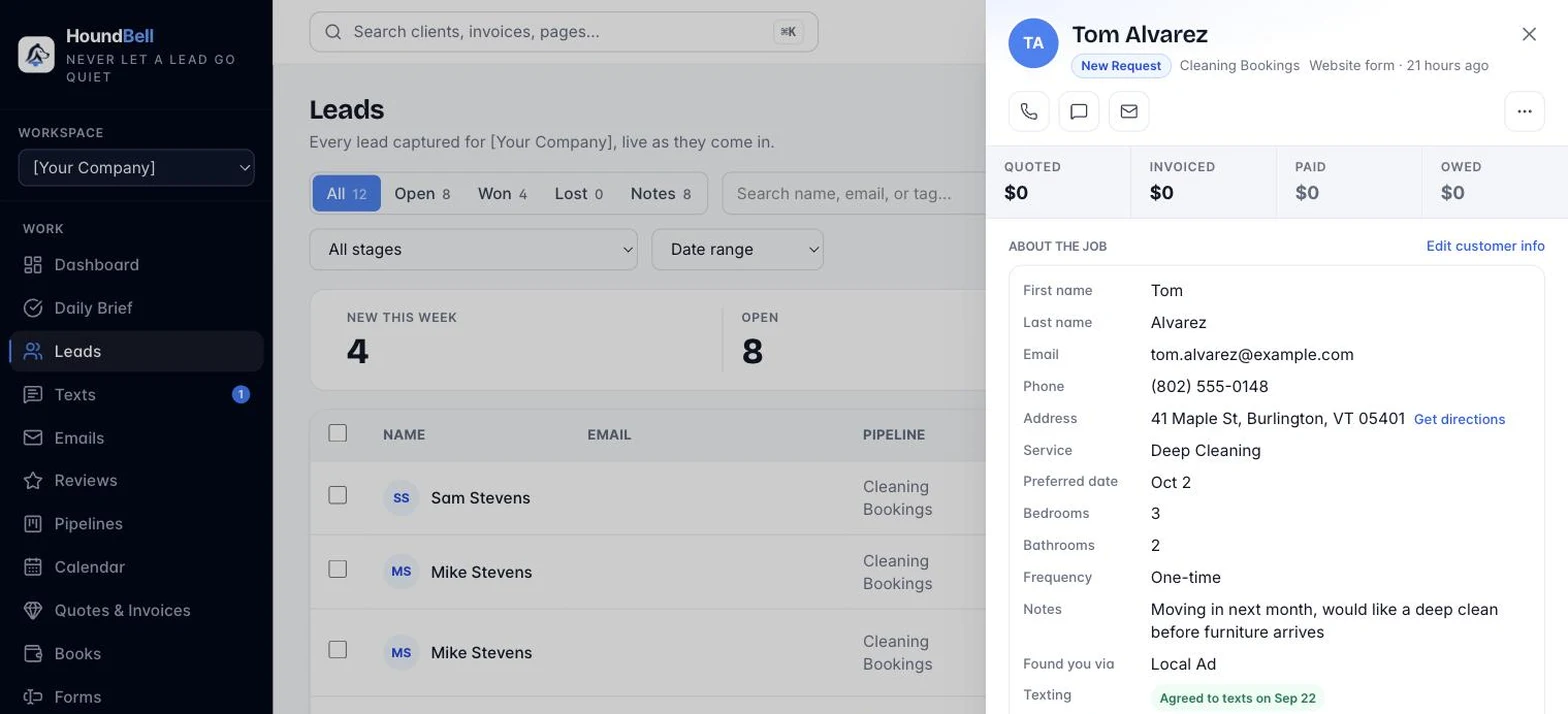
Whichever camp you are in, seven jobs separate a CRM that earns its subscription from a contact list with a logo:
- Capture without retyping. Website form, phone call, or referral, the lead should create itself, with the source recorded so you know which marketing paid
- Reply in minutes. An instant acknowledgment and a task for a human follow-up. Speed is the highest-leverage feature in the category
- Quote from the same record. Line items, one click to send, and automatic follow-ups when the client goes quiet
- Put terms in writing. A signed agreement with an audit trail before the crew rolls. The tools that treat contracts as an integration cost you exactly when it matters
- Schedule against reality. Real hours, crew assignments, reminders to the client, directions to the tech
- Collect without chasing. Invoice from the quote, card payment on a public link, automatic overdue nudges, autopay for recurring work
- Ask for the review. Automatically, right after the job, with your Google link. This is next quarter’s lead flow
The pricing traps to read for
Three patterns inflate a contractor CRM bill past the sticker. Per-user pricing looks fine at one seat and compounds as you hire: an extra office hire at $29 to $35 a month per seat is real money by year end, and field techs should not cost a seat at all. Add-on culture sells the plan, then sells the pipeline, the texting, and the AI separately. Metering charges you per contact or per message, which taxes the exact growth you bought the tool to create. Whatever you shortlist, price your real team and your real message volume, not the demo account. HoundBell’s pricing is one number per plan with nothing metered, which is the standard I would hold any vendor to, including us.
A short list to start from
Service contractors comparing tools head-to-head should read the full best CRM for contractors ranking. The one-paragraph version: HoundBell for the lead-to-signed-contract-to-paid path in one price, Jobber for dispatch-led field service, JobNimbus for roofing, Buildertrend for builders and remodelers running true projects. Plumbing shops have their own dedicated guide.
Switching without losing your history
The switch is smaller than it looks. Export your customer list from the old tool as a CSV, and import it into the new one before you cancel anything. A good importer recognizes the source format, maps names, phones, emails, addresses, and notes, skips duplicates, and tags the batch so you can undo it. HoundBell’s importer does this for Jobber, Housecall Pro, HubSpot, Pipedrive, HighLevel, and any generic spreadsheet. Run both tools for one overlap week, point your website form at the new one, and let the old subscription lapse when the pipeline is living in the new system.
Quick answers
What does a contractor CRM cost?
Field-service CRMs with published pricing run $49 to $329 per month; construction platforms are often quote-based. HoundBell runs $57 to $197 with nothing metered. The sticker matters less than the seat fees and add-ons your real team triggers.
Is a CRM worth it for a one-person contractor?
Usually, and earlier than most owners think. The value is not contact storage, it is the automatic follow-up: the day-3 quote nudge and the overdue-invoice reminder that go out while you are on a roof. One saved job a month pays for a year of software.
What is the difference between a construction CRM and a field-service CRM?
A construction CRM manages long projects: budgets, schedules, selections, change orders. A field-service CRM manages sold jobs: quote, schedule, invoice, review. Match the tool to the length of your average engagement.
The bottom line
Pick your camp first: projects or jobs. Then hold every candidate to the seven jobs above and price your real team against the traps. If your work is jobs, HoundBell was built for exactly this path, from $57 per month ($47 founding, locked for life), and the live demo lets you judge it in five minutes without a signup.
A CRM that already knows what a job is
Pick your trade, get a pipeline, form, booking page, and contract built to match. Free for 14 days, no card required.
Start freePrices are from each vendor’s public pricing page in September 2026, monthly billing, and can change. HoundBell is not affiliated with the companies mentioned; trademarks belong to their owners.

Michael Barros
Founder of HoundBell and of Business All In One Marketing Solutions, a digital marketing agency serving local businesses since 2017. Michael writes about lead capture, follow-up systems, and the software local service businesses run on. More about Michael