
Jobber and Housecall Pro are the two names every home service owner hears first. Both schedule jobs, send invoices, and take card payments. Both are good at what they do. And both will run you somewhere between $700 and $4,000 a year once your team grows past one person, which is exactly the point where most owners start comparing them line by line.
The short answer: Jobber is the stronger pick for solo operators and quote-heavy trades like landscaping. Housecall Pro is stronger for dispatch-heavy teams like HVAC and plumbing that live and die by the schedule board. If you mainly need lead capture, quotes, invoices, and bookings without a per-user bill, with or without a website, HoundBell covers that whole path from $57 per month ($47 with founding pricing), everything included and nothing metered, with a 14-day free trial.
I run a marketing agency that has built and managed websites for cleaning companies, landscapers, and contractors since 2017, and I have set clients up on both of these platforms. This comparison covers current pricing, where each one actually wins, and when neither is the right fit. For deeper side-by-sides, see HoundBell vs. Jobber and HoundBell vs. Housecall Pro.
Jobber vs Housecall Pro at a glance
| Jobber | Housecall Pro | HoundBell | |
|---|---|---|---|
| Starting price | $29 to $49/mo1 user | $59 to $79/mo1 user | From $57/mo3 full users + 5 free crew logins |
| Mid tier | $99 to $139/moup to 5 users | $149 to $189/mo5 users, then $100/mo per extra seat | $127/mo10 full users + unlimited free crew |
| Top tier | $399 to $499/mo15 users | $299 to $329/mo8 users, then $75/mo per extra seat | $197/mo25 full users, unlimited field crew |
| Free trial | 14 days | 14 days | 14 daysno card required |
| Watch out for | Automations and texting live in the $99-and-up tiers | Per-seat costs stack fast past the included users | No GPS tracking or dispatch board |
| Best for | Solo operators, quoting trades | Dispatch-heavy teams | The lead-to-payment path in one tool |
| Website forms | Embedded widget | Embedded widget | Any website; native plugin on WordPress |
| E-sign contracts | On higher tiers | Add-on tools | Included on every plan |
| Online booking | Yes | Yes | Yes, on your own site with availability checks |
Prices above reflect each vendor’s published plans as of September 2026 and vary with billing term. Always confirm on their pricing pages before you buy.
Where Jobber wins
Jobber’s quoting flow is the best of the three for trades that sell custom work. Quotes support optional line items and photos on higher tiers, clients approve online, and the follow-up automation nudges silent quotes without you thinking about it. The client hub, where customers can view quotes, invoices, and appointment history in one place, is genuinely slick.
Its Core plan is also the cheapest respectable entry point of the two big names, which matters when you are a one-truck operation. The catch is that everything you actually want, like automated reminders and two-way texting, lives in the $99-and-up tiers, and per-user pricing climbs fast from there.
Where Housecall Pro wins
Housecall Pro is built around the dispatch board. If you run crews across a city and reshuffle the day constantly, its drag-to-reschedule board, route optimization, and live traffic reordering on the Max plan are the strongest in this comparison. Its consumer-facing booking flow, where customers book from Google or your site around your real availability, is polished too.
The tradeoff is cost structure. Extra users on Essentials are $100 per month each, which makes a five-to-eight person shop meaningfully more expensive than the sticker price suggests.
Where both fall short for website-first businesses
Both platforms treat your website as a place to paste an embedded widget. The form is an iframe pointed at their servers, styled their way, and your leads live in their system. If your website is the engine of your business, and for most local service companies the website is where the leads actually come from, that setup has two costs: the form never quite matches your site, and your customer list is one subscription cancellation away from being hostage data.
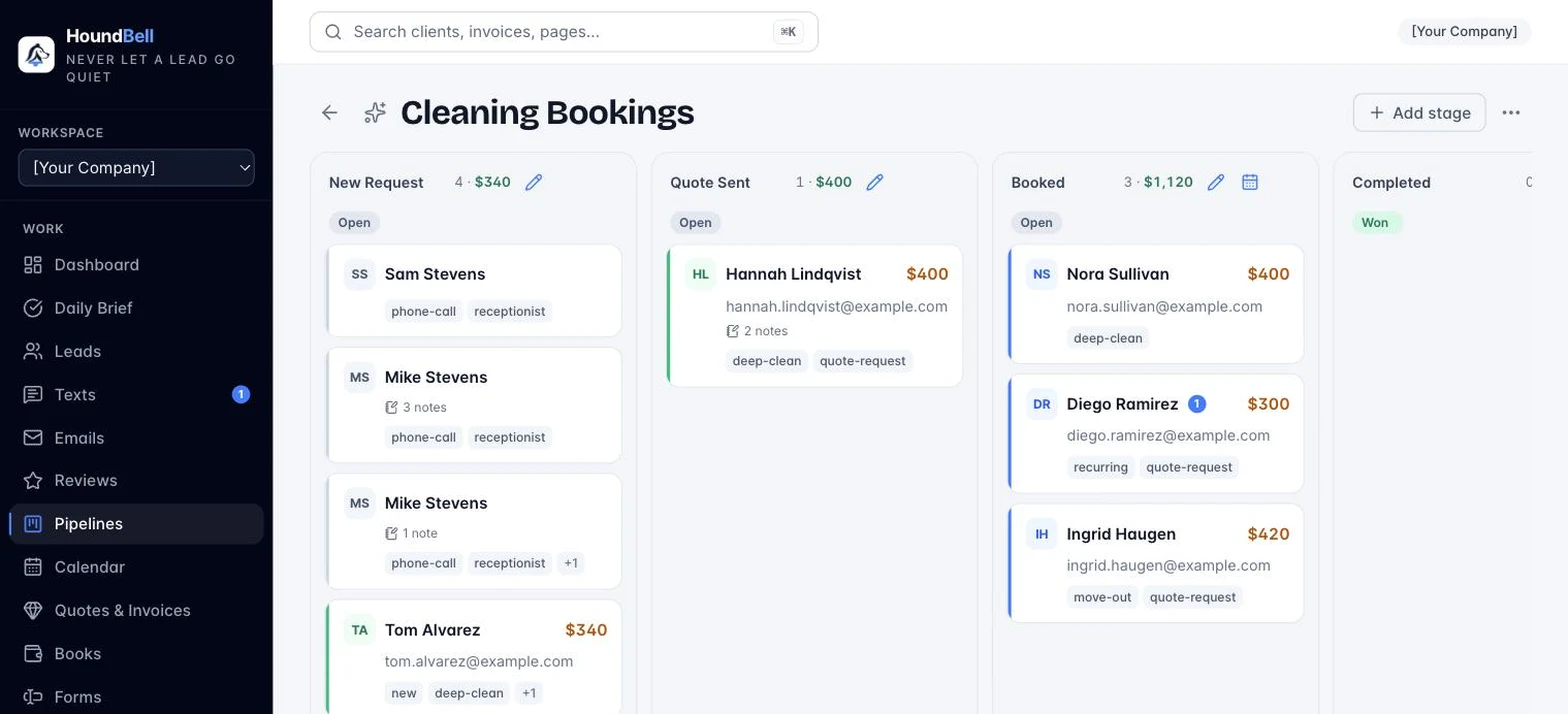
HoundBell approaches it from the lead side. Forms go on your website whatever it is built with (a free plugin renders them natively on WordPress), the hosted booking page works with no website at all, and every submission becomes a pipeline lead the moment it arrives, and the same system handles quotes, e-sign contracts, invoices, card payments, and bookings. Automatic follow-ups for unanswered quotes and unpaid invoices are included on every plan, on by default. The seat math is stark once a crew is involved: the $127 Growth plan includes 10 full users plus unlimited free field-crew logins, about $12.70 a seat, where Jobber’s five-user Connect plan works out to roughly $27.80 a seat. Your data exports to CSV any time, and the site connection takes about two minutes.
The verdict
Choose Jobber if you are a solo operator or a quote-driven trade and you want the smoothest quoting and client-approval flow on the market.
Choose Housecall Pro if you dispatch multiple crews daily and route efficiency is the difference between five and seven jobs a day.
Choose HoundBell if you want the lead-to-payment path, forms, pipeline, quotes, contracts, invoices, and bookings, in one tool without a per-user bill, from $57 per month with a 14-day free trial.
Your website already gets the leads. Keep them.
HoundBell turns your website, or just your booking link, into a complete sales system: capture, quote, sign, invoice, get paid.
Start freeRelated reading: 7 best Jobber alternatives and the best cleaning business software roundup.

Michael Barros
Founder of HoundBell and of Business All In One Marketing Solutions, a digital marketing agency serving local businesses since 2017. Michael writes about lead capture, follow-up systems, and the software local service businesses run on. More about Michael