
HoundSignal: paste a post, get a scored lead
HoundSignal is an add-on ($47 a month, founders $37). It finds people nearby who are asking for the kind of work you do and tells you how real the ask is. Open Signals in the sidebar.
Turning HoundSignal on. It is free for the whole 14-day trial on any plan. After that, open Billing and press Turn on on the HoundSignal card, or press Turn on HoundSignal on the Signals page or the Settings card. It goes on your existing plan today at $47 a month ($37 a month if your account has founders pricing), prorated for the rest of the month, and it works on Starter, Growth and Scale. Picking a plan for the first time? Tick Add HoundSignal above the plan cards and it comes with the plan. To turn it off, press Turn off on the same card: it ends today and the unused days come back as a credit on your next invoice. The card also shows how many posts were scored this month out of 3,000.
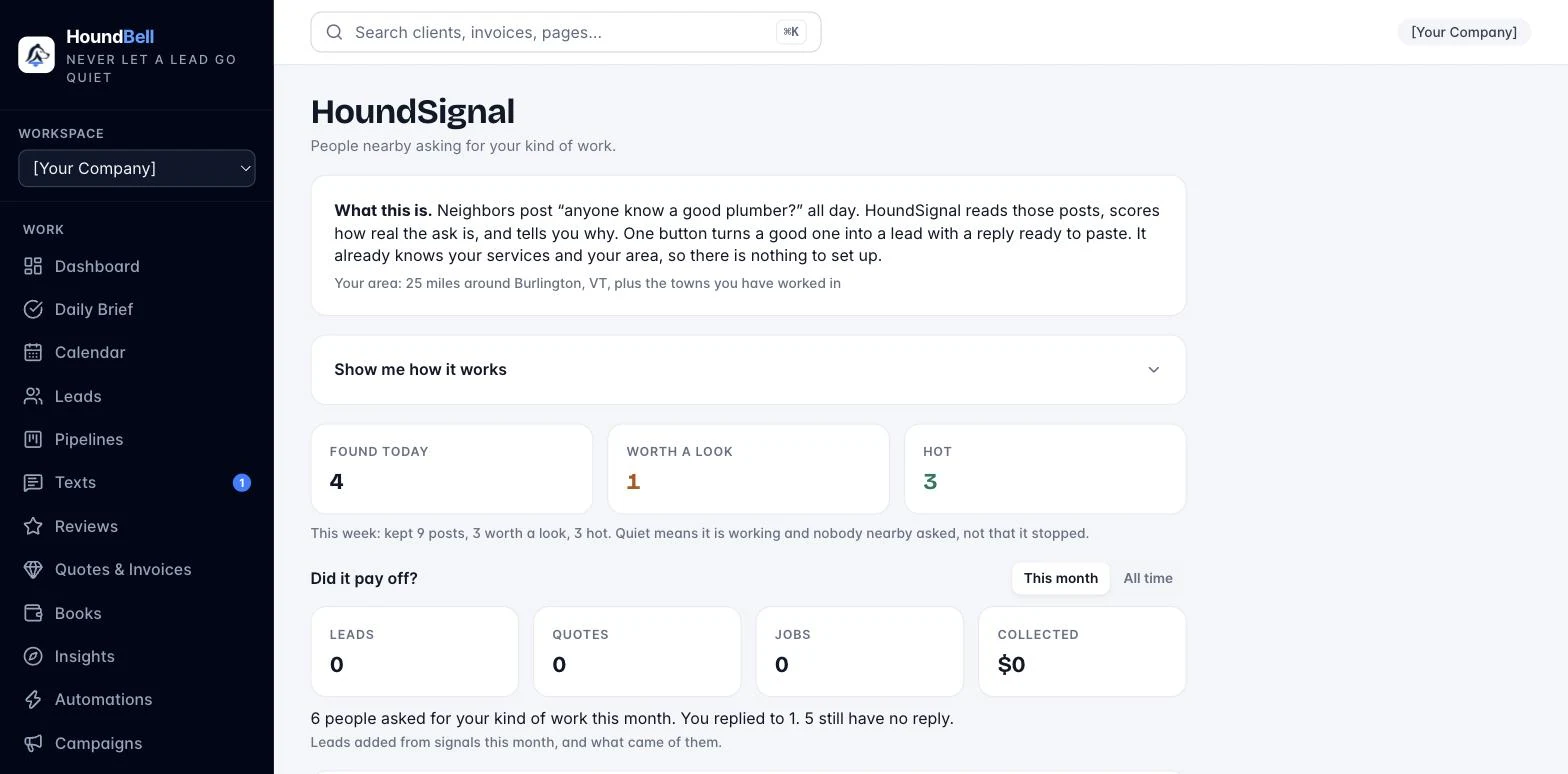
Paste a post. See a post in a Facebook group, on Nextdoor, in a text from a friend, anywhere. Copy it, paste it in the box at the top, add the link if you have one, and press Score it. In a couple of seconds a card shows up with a score from 0 to 100. Hot is 80 and up. Worth a look is 50 to 79. Anything under 50 sits behind Show the rest so the page never fills with noise.
Why we flagged it. Every card says why in plain words: they are asking for someone, it matches a service on your price book, the town is inside your area, they want it this week. There is nothing to set up. The app already knows your services from Settings, Services and prices, and your area from your business address plus the towns you have been booked in over the last year.
The four buttons.
- View post opens the post where it lives.
- Copy reply writes a two-sentence reply in your business name that ends with your booking link (or your phone number if the booking page is off). It shows in a small box so you can change a word, then press Copy again. You paste it under the post yourself. HoundBell never posts anything for you.
- Add to leads makes a lead with the post as the first note, the service and town filled in, and opens the client card. The note starts with when the post went up and when HoundSignal found it, in your timezone, and the site it came from; the card on the Signals page shows the same stamp (“Posted Sep 30, 2:15 PM”). From there it is a normal lead: text, quote, book, invoice.
- Not for me hides the card. Pick a reason (wrong service, wrong area, not a real ask, spam, already filled or closed, too old). Tell us “not a real ask” three times about the same kind of post and we skip posts like it from then on.
Not for me teaches it. Every reason except “already filled or closed” counts against the site the post came from, and Add to leads counts for it. A site that gets five marks against it and none for it is dropped from your searches; a site that gets three for it is searched first. “Wrong area” also stops the searches from targeting the town that post named. The Settings card shows what it learned (“Learned from you: skipping 2 sites, favoring 1.”) and a Reset what it learned link puts it back to the start.
Clear the rest. Open Show the rest and press Clear these to hide every low card at once as “too old”. That is housekeeping, not feedback: it teaches nothing about the sites.
Where it looks. Nextdoor, Facebook groups, Reddit, city-data, Alignable, Quora, Craigslist (gigs and “wanted” posts), and, when you work anywhere, the gig boards (Contra, Freelancer, PeoplePerHour, Upwork jobs, Guru). Everything comes through the web search; HoundBell never signs in to or scrapes any of these sites.
Settings, HoundSignal. The area line shows what the app worked out (“25 miles around Burlington, VT, plus the towns you have worked in”). Slide the radius between 10 and 50 miles. Pick when to be alerted (only hot ones, hot and worth a look, or nothing) and how (push, text). The usage line shows how many posts were scored this month out of 3,000.
We work anywhere. If you meet clients online (marketing, consulting, bookkeeping, anything you can do on a video call), turn on We work anywhere (we meet online) under the radius slider in Settings, HoundSignal. The radius slider goes away and the area line reads “Anywhere. You meet clients online, so posts from any town count.” Your business address becomes optional. The app then searches the way owners ask online (“looking for someone to build my website”, “any good freelancer for website design?”) with no town in the search, a post from any town scores the same as one next door, the card says “Online” when the post does not name a town, and the reply offers your open time as a call (“We can talk Thursday at 2, online.”). Marketing, consulting, and digital forensics businesses start with it on; a trade that drives to the job leaves it off.
Alerts. When a good signal lands you get a push notification on your phone that says what it is (“Someone in Danvers needs a water heater this week.”). Tap it and the card is right there, lit up. Turn on Text message to my phone and you also get a text. Texts wait until morning during quiet hours and stop at 10 a day, and the card shows “Texts today: N of 10”. Your Daily Brief has a section called Signals worth a look with yesterday’s best signals you have not acted on yet. Each line opens the card.
Did it pay off. Under the three daily numbers on the Signals page is a row that follows the money: Leads (signals you added to leads), Quotes (quotes you sent them), Jobs (the ones you booked or won), and Collected (what they paid). Switch between This month and All time. On Scale, the same leads show up on Insights under the source HoundSignal. What makes it different. Other tools stop at the alert. HoundSignal uses what HoundBell already knows about your business, so the card and the reply carry facts nobody else can offer. Crew nearby: if you have a confirmed job in that town in the next 7 days, the card gets a “Crew nearby Thu” pill, the score goes up, and the reply can say your crew is already there that day. A real time: Copy reply checks your calendar first and offers the first open slot this week that fits the job (“We have Thursday at 2 open”), with a booking link that already has that service picked. If the week is full, it says so and offers to put them first on next week’s list. The card shows the time you offered. Proof: when it is true, the reply adds one line, like “We take care of 14 homes in Danvers” (only when it is 3 or more homes from your own bookings) or your Google rating (only at 4.5 or higher with 10 or more reviews). Every number comes from your HoundBell data. Nothing is guessed.
Set it up in five minutes. The Signals page has a “Show me how it works” fold that checks these for you and shows a check mark or a fix link for each.
- Set your business address in Settings, Business details so the app knows your area.
- Name your services the way customers ask. “Website design”, not “Website”. A one-word name under six letters is too short to search for.
- Turn on alerts in Settings, HoundSignal. Texts are optional but worth it if you are out on jobs.
- Get the Chrome button (HoundSignal Capture) and connect it, or skip this and paste posts by hand.
- Paste a post in the box and press Score it to see a card.
Then it runs on its own: the web is checked every hour, Reddit posts included, hot posts become leads with a reply ready, you paste the reply where the post lives, and missed calls and receptionist calls that did not book show up too.
Why nothing shows yet. The first hourly web check waits for waking hours, 6am to 10pm in your business’s timezone, so a business turned on at night sees its first web pass in the morning. A new area with quiet forums can take a day before the first post lands. Paste a post in the meantime to see how a card looks.
Signals from your own phone. Some of the best signals are already yours. When HoundSignal is on, two things show up as cards on their own. A missed call that nobody texts or calls back within 2 hours (“Missed call from (802) 555-0177 at Mon, Sep 28, 8:40 AM. No callback yet.”). A call your AI receptionist answered that did not end in a booking, with the summary as the card. These cards count toward your monthly 3,000. HoundSignal never texts or emails the caller for you. You decide who to follow up with, same as any other card.
Still stuck?
Email us and a person will answer. Include your workspace name, and the quote or invoice number if it is about one.
Email support@houndbell.com