
How the Daily Brief decides what to tell you
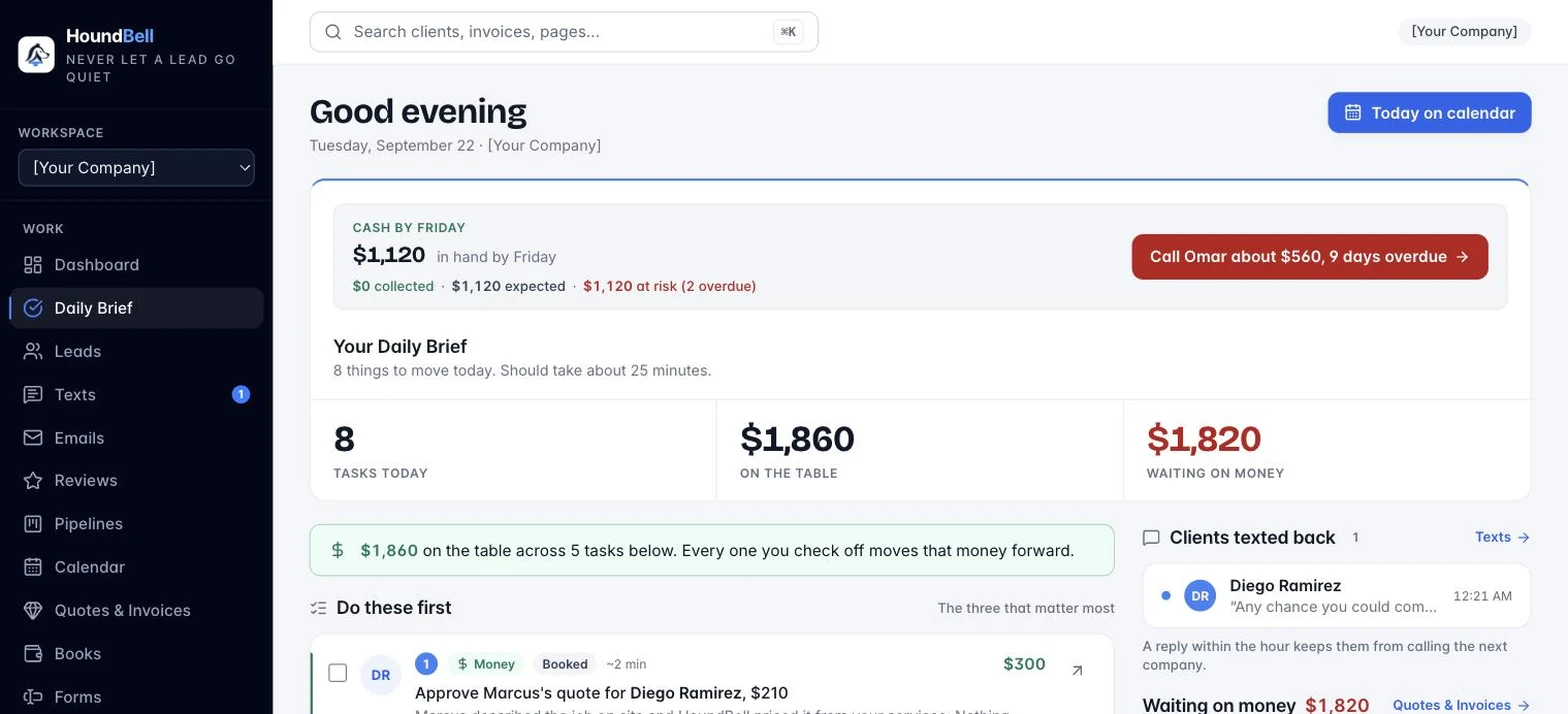
Each task line is a judgment, not just the stage’s script. The brief looks at everything true for that client and picks the most important move: if their message says they went with someone else, it tells you to close them out (or ask what would have won it) instead of chasing; an overdue or opened-but-unpaid invoice comes before anything else; a quote they viewed but did not answer asks for a follow-up with the amount and how long it has sat; a visit already on your calendar tells you to prepare rather than book; otherwise you get the stage’s own next step, with a note when a lead has sat in a stage for days. The colored chip on each line says which kind it is (Decide, Money, Scheduled, Next step), and the line under it explains why. Check the box when it is done; it resets when the lead moves to a new stage.
Acting straight from the brief. Under each task you’ll see the buttons that fit it. Money tasks have Send nudge, which sends the reminder for that quote or invoice, and Call. Scheduled tasks have Open on calendar, which takes you to that day with the booking open, and a booking that is still a request has Confirm booking right there: one click sends the client their confirmation and reminders and puts the job on the crew’s phone. Decide tasks have Ask why, which texts the client a friendly check-in if they said yes to texting (otherwise it opens an email for you), and Mark lost, which closes them out with a reason. Every task has Snooze task: pick tomorrow, in two days, next Monday, in a week, or any day on the calendar, and the task steps aside until that morning. Snoozed tasks wait under a “Snoozed” list where Bring back returns them early.
Do these first. When more than three tasks are waiting, the brief lifts the three most important to the top with a 1, 2, 3 so you always know where to start. The band tells you roughly how long the whole list should take, and how yesterday went: tasks cleared, deals won, bookings confirmed.
Today’s schedule. Confirmed visits for today appear in a strip under the band with the time, client, who’s assigned, and the address. Click one to open it on the calendar. A visit disappears from the strip the moment it is marked done.
Clients texted back. Unanswered texts from clients show in the right column with a preview of what they said. Click one to open the conversation in Texts.
The 7 AM brief. Every morning at 7 in your business’s timezone, HoundBell sends you the same brief as a push notification and an email: what to do first, today’s visits, and the money numbers. If nothing is waiting, it stays quiet. Set your timezone in Settings so it arrives at the right hour.
Still stuck?
Email us and a person will answer. Include your workspace name, and the quote or invoice number if it is about one.
Email support@houndbell.com