
Pipelines and stages
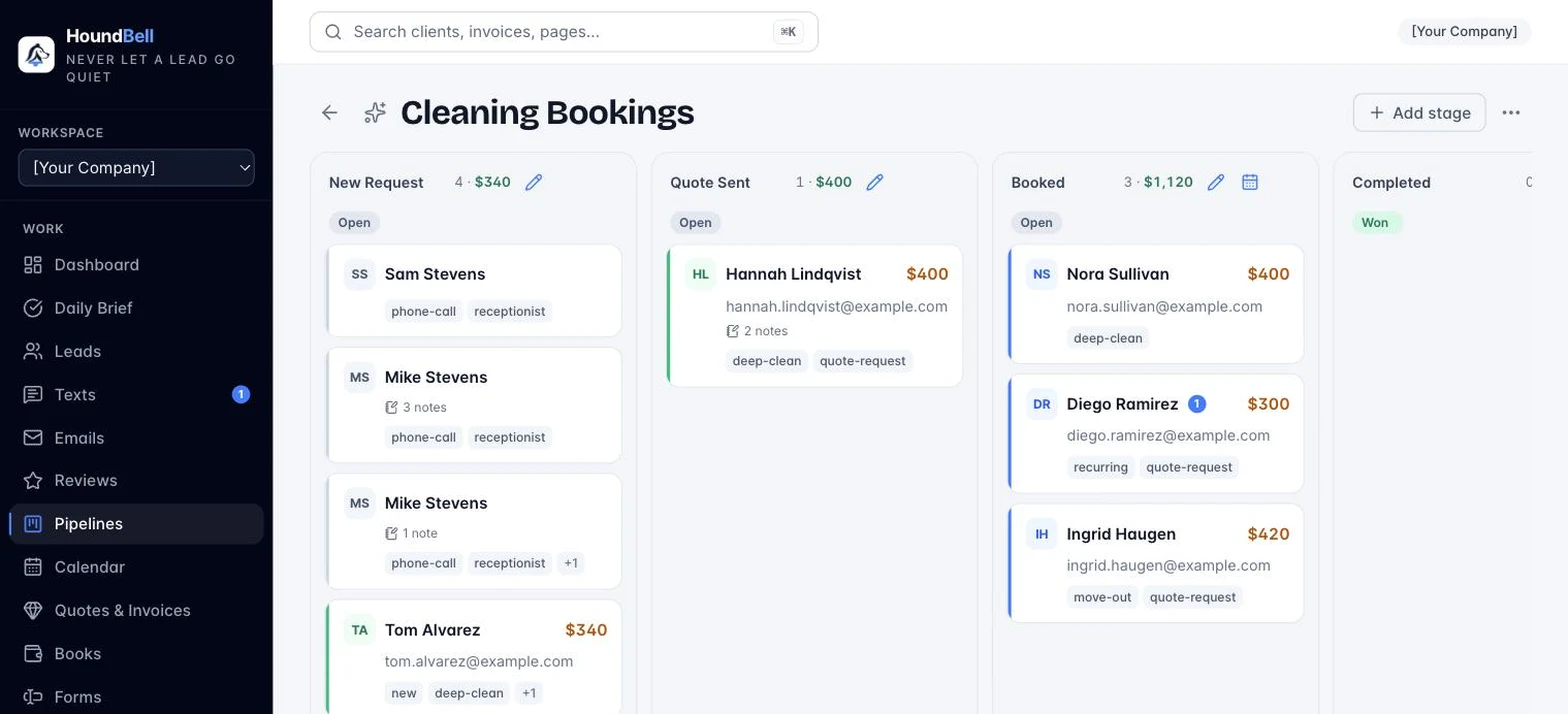
A pipeline is a board of columns (stages) that a deal moves through, for example New, Contacted, Qualified, Won, Lost. Open Pipelines and click a board to work it. Drag a lead’s card from stage to stage as the deal progresses. Click a card to open the full lead.
You can have multiple pipelines (for example one for residential jobs and one for commercial contracts), and templates for common industries give you a ready-made set of stages.
Each stage has two special settings, edited with the pencil on the stage:
- Outcome: Open, Won, or Lost. This is how HoundBell understands money. Moving a lead into a Won stage counts its value as revenue on that day. Open stages count toward pipeline potential. Lost stages count as neither.
- Action template: the to-do this stage generates for the Daily Brief, for example “Call {name} to schedule an estimate.” Write {name} where the lead’s name should go.
- Scheduling stage: mark a stage as a scheduling stage and dragging a lead onto it opens the booking window, prefilled with that client.
Winning and losing are moments, not just columns. Drop a deal on Won and a congratulations window offers a prewritten thank-you email, your Google review link included, ready to send or edit on the spot. Drop one on Lost and it asks why, with the reason saved to the client’s record so you can see the patterns in what slips away.
Still stuck?
Email us and a person will answer. Include your workspace name, and the quote or invoice number if it is about one.
Email support@houndbell.com