
The complete tour
Every feature in HoundBell
One tool carries the whole job from “someone filled out my form” to money in the bank. Here is everything inside, in plain language, with nothing hidden behind a sales call.
Free for 14 days. No credit card required.
Capture
Capture leads from your website
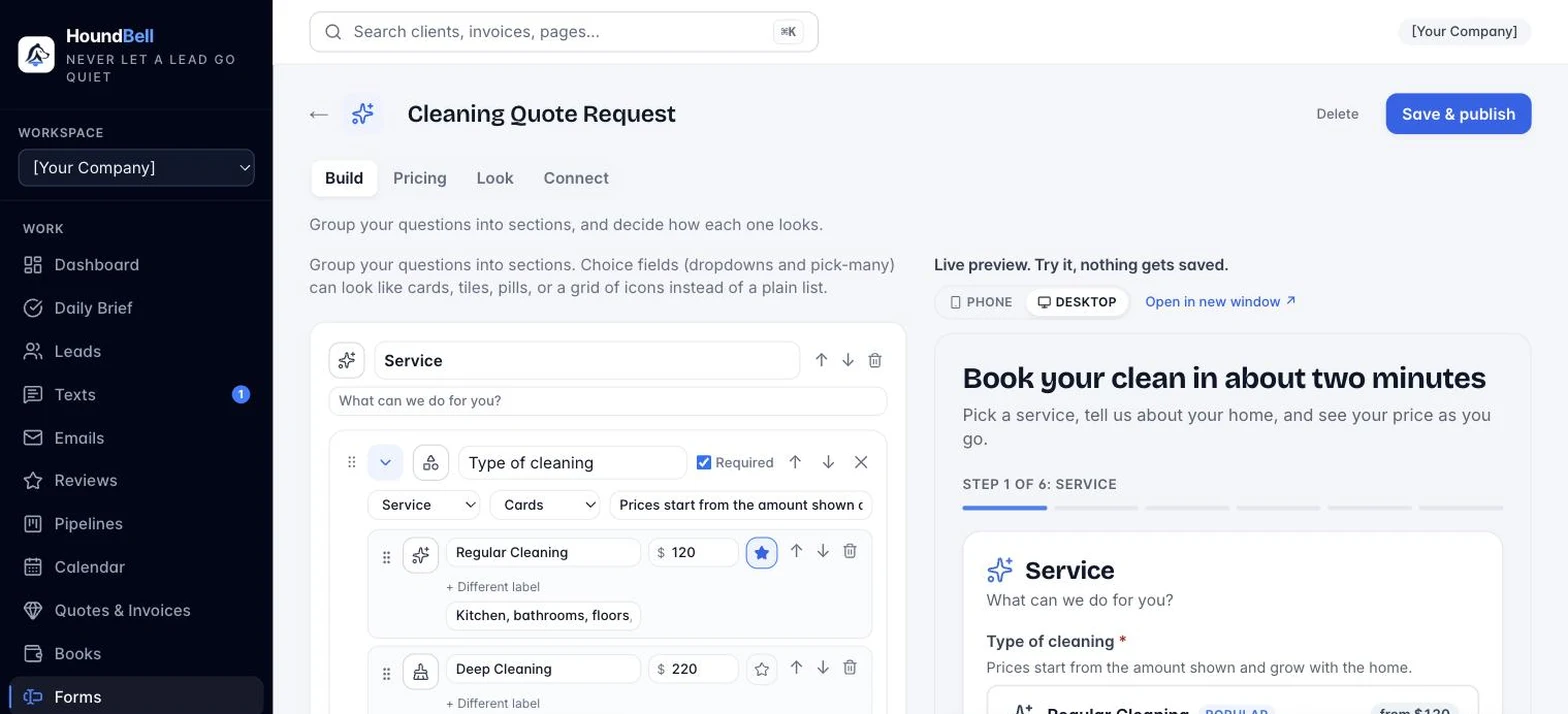
Build your form in the app and watch it update live as you type. Publish once, and every edit streams to your site instantly.
Forms ask only what applies. On Growth and Scale, show a field only when an earlier answer calls for it: a pet-details box when they check “I have pets,” an insurance question when they pick “storm damage.” Pick-many checkbox groups are on every plan, with the same looks as pick-one: cards with icons and subheadings, tiles, pills, or a grid. And one form runs anywhere with one line of code: Wix, Squarespace, Webflow, Shopify, GoDaddy, WordPress, or any custom site. On WordPress there is also an optional one-click plugin.
- Late cancel fee. Set the fee and the window; the client’s own page warns them once and charges the card on file, and the policy line sits right on the booking pass.
- A location stamp at clock in and out. Only at the tap, never tracking: Timesheets shows “at the job” or the distance beside each punch, and the payroll export carries it.
- Pay by percent of the job. A fourth pay type: the person gets their percent of each job’s price, split by hours when two share it, carried to payroll exports and job costing.
- At the house, as fields. Key, lockbox, gate and alarm codes, pets, products, allergies, parking: set slots on the client card, shown to the crew in the same order every visit. Codes show on the crew’s pass only.
- Checklists on the pass. Every service can carry a checklist; the crew ticks items off as they go and finished items show on the client’s report card as “What we did.”
- Every client gets their own page. One magic link to see upcoming visits, ask to move one, pay invoices, update their card, and read their report cards. No login, no password.
- Charge the card when the job is done. Done bills the visit on its own: the card on file is charged and the receipt goes out, or an invoice with a pay link is emailed when there is no card.
- Tips on the receipt. A tip box on the paid page, recorded against the invoice and the crew member, with a Tips column on the payroll exports.
- The job receipt. Every finished job can hand the client one dated page: the booked and done stamps, the crew’s note, the checklist, the before-and-after photos. Open it or send it from the booking; the link rides on the invoice.
- The Home Record. Clients get one page that remembers every job at their home, with a code sign-in and a Book again button. Each business sees only its own work.
- A proof line on the booking page. “Answered in 2 minutes” or “4 jobs done in the last 30 days”, stamped from your real activity, never typed.
- Week and Day views. Seven day columns over hour rows, every booking sized by its duration and colored by its state, two jobs at the same hour side by side, a red now line on today, and a Day view with one lane per crew.
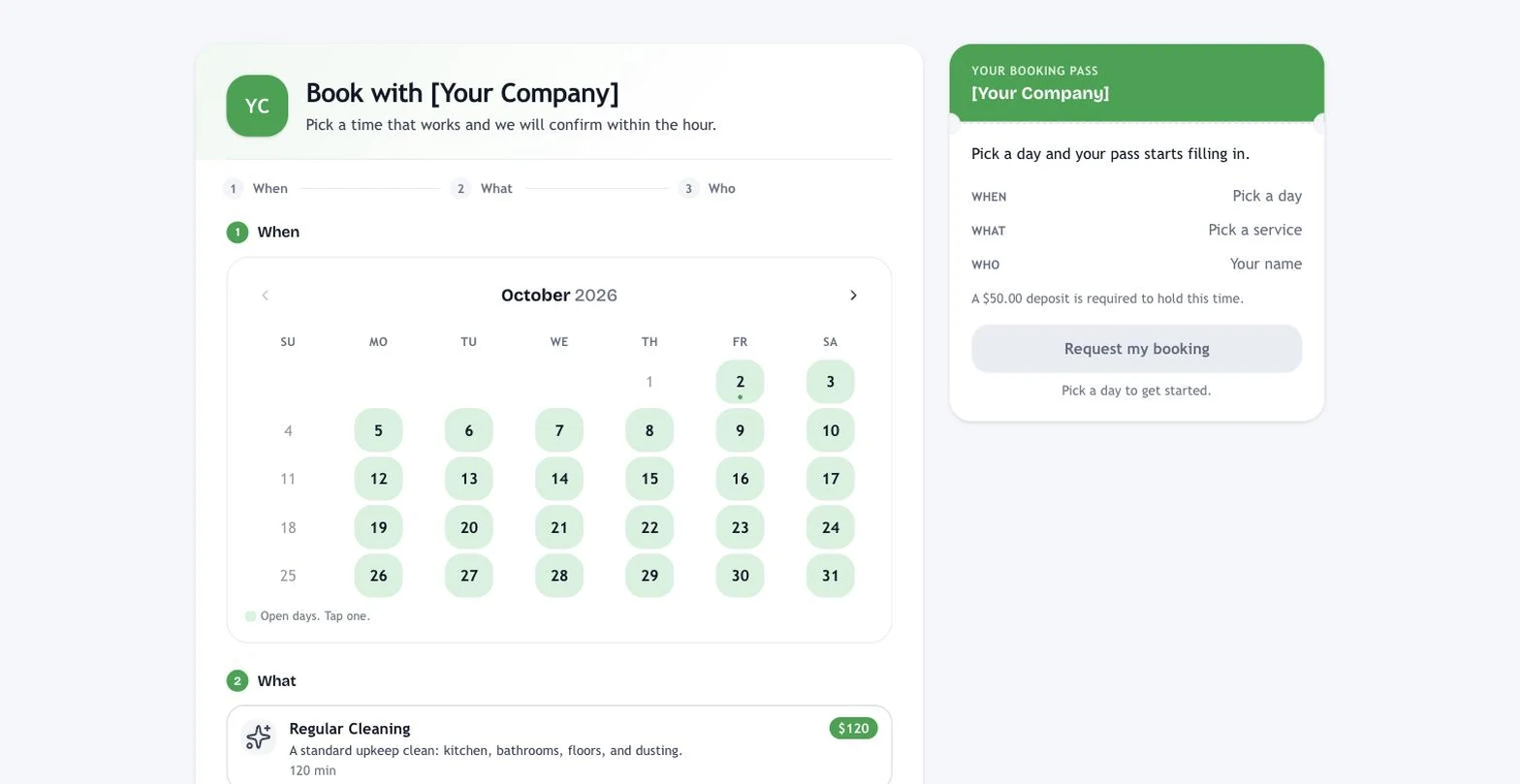
- The booking pass. Your hosted booking page is built around a ticket that fills itself in as the client chooses, in plain words, with the price and one Request my booking button.
- Instant price before they book. Bedrooms, bathrooms, square feet, add-ons, frequency discounts, zip codes and promo codes: the page totals it live, and the server runs the same math on submit.
- Industry templates. Ready-made forms and pipelines for cleaning, landscaping, roofing, plumbing, home services, pet waste removal, auto detailing, and marketing agencies, with more shipping regularly.
- One shortcode, always current. Paste the form shortcode into your site once. Every Save & publish updates the live form instantly, with nothing to re-paste.
- Your look, not ours. Fonts, colors, button styles, and corner roundness match your website. Forms render in your theme, not in an iframe.
- Marketing attribution, automatically. Every lead a
- Build it with me. Five pla
- One document header. Invoices, quotes, agreements, change orders and statements share a clean printed-invoice shape: your logo or wordmark, the document name, your business details, and the amount on a tinted row. The first email for each carries the same letterhead. in questions and the form is made: the right fields for your trade, the look you picked, the price book wired in. No field types, no settings.
- One at a time. A fourth form look: every question is its own screen with a progress bar, on your website, the hosted page, and WordPress alike. rrives knowing which ad, search
- Capacity, not one-job-at-a-time. Tell HoundBell how many jobs you can run at once (or let it co
- Client replies reach the truck. When a client texts back and has a job today or tomorrow, the crew on it gets the message as a push, and their pass shows a “Grace says” strip. Two-way, with nobody in the middle. unt your crews) and a time stays open until you are actually full. The booking page, your forms, and the receptionist all follow it.
- Pause for the season, restart on its own. A repeating plan pauses to a date; two weeks before, the client gets “Ready to start again?” and one tap books their old spot. Snow, lawn, pool, seasonal cleaning: the loop closes itself. , or referring site sent it. No cookies, nothing to configure.
- Smart phone fields. A country code menu validates numbers before the form submits, and US numbers format themselves as (555) 123-4567.
- Serious spam protection. A hidden honeypot catches bots, rate limiting blocks floods, and smart screening refuses impossible names and emails outright. Suspicious-but-possible entries arrive tagged possible-spam, so a real customer is never lost.
- Quick adds. One-click building blocks: a booking calendar, a services dropdown wired to pricing, a “How soon do you need this?” question, and a text-consent checkbox.
- Forms that look designed out of the box. Service cards with icons and prices, sizes as tiles, extras with price badges, and a running total while the visitor picks. Three looks to choose from.
- A hosted link for every form. No website? Every form gets its own hosted page you can text, post, or print on a flyer.
- Instant estimates. Show a price range on the form itself, computed from your services list, before you ever pick up the phone.
- One services and prices list. Set a price once and it flows to your booking page, forms, quotes, deposits, and the receptionist.
- Six one-tap themes. Clean blue to bold dark: one tap restyles the whole form, and the same themes now dress your booking page and gift card page. Everything stays adjustable.
- Ad tracking that counts. Paste a GA4 ID once and every booking and form submit fires a conversion event; each form can send visitors to your own thank-you page so Google Ads goals count it.
- Customers and contacts, not just deals. Mark anyone a customer, keep a mailing list as contacts, and Move to sends selected leads to any stage, Customer, or Lost in one tap. Imports ask what the list is, so mailing lists stay off the board.
Your morning
Start every morning with your Daily Brief
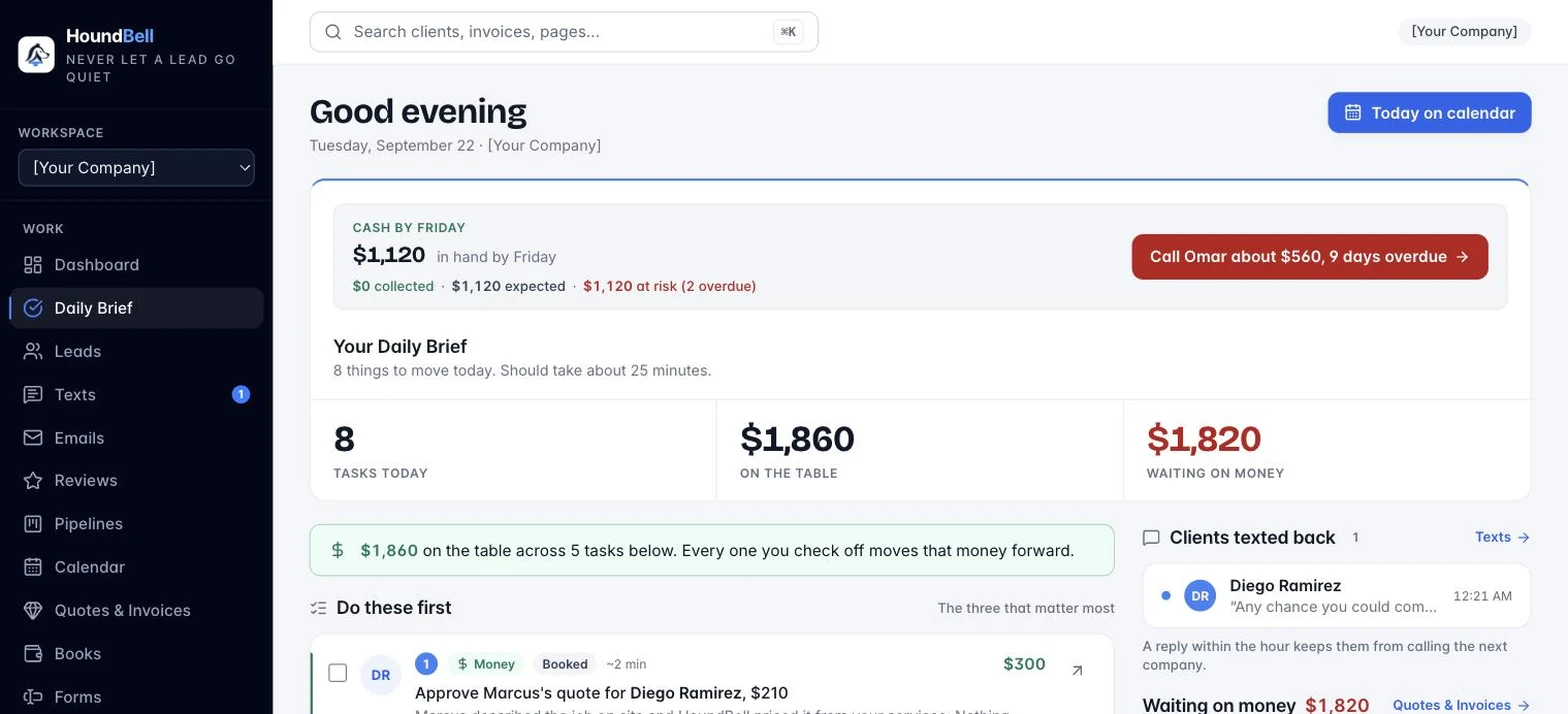
$14,850 waiting on action. 3 new leads to greet. 2 quotes awaiting answers. 4 unpaid invoices. 1 booking request.
HoundBell reads your pipeline every morning and writes the to-do list itself: who to contact, what to send, and how much money each item moves forward. No reports to interpret. Just today’s list, ranked by dollars.
Organize
Work your leads without losing one
Every lead in one place, appearing in real time as forms are submitted. No refreshing.
- Search and filter everything. Status chips, search by name, email, or tag, filters by pipeline, stage, and date range. Counts, tables, and exports all follow your filters.
- The lead card. Everything about one person: their exact form answers, notes, quotes, invoices, signed agreements, schedule, tags, service, and deal value.
- Notes that stay with you. A running history on every lead, plus a Notes view that lists every note across every client, searchable and exportable.
- Bulk actions. Select and delete in batches, with a typed confirmation guarding anything permanent.
- Duplicate protection. Adding a lead whose name, email, or phone number already exists pauses with a warning, so you never split one customer across two records by accident.
- Built for repeat business. HoundBell recognizes returning customers by email or phone and puts their new request on the card you already have, with every past deal preserved in a permanent history and a lifetime value on every client. Competitors treat every form fill as a stranger; HoundBell knows your deck customer is also your roof customer.
- Import and export. Bring your existing list in from any spreadsheet with smart column matching. Export any filtered view to CSV, with every form answer preserved.
It remembers Maria
Maria hired you for a deep clean in March. She fills out your form again in September. HoundBell knows it’s Maria: same card, full history, new request on top, lifetime value updated. Returning customers are recognized by email or phone, so nobody who already paid you gets treated like a stranger.
On Scale, the list works itself: email campaigns go to smart segments (who has not booked in 90 days, who bought one service but not another), and Automations are switches, not a builder: text new leads within two minutes, remind clients the day before, charge the card when the job is done, win back customers who went quiet, check in after two skipped visits, restart paused seasonal plans, nudge the next visit, send seasonal check-ins, and thank people who refer a friend.
HoundSignal (add-on, $47 a month, $37 for Founding Members): leads that are already asking. Paste a post from a local group, or press the HoundSignal Capture button in Chrome, and a scored card says how real the ask is, with a ready reply that offers your first open slot and ends with your booking link. One press adds it to your leads. It checks the web every hour, includes 3,000 scored posts a month, and the Chrome button is live in the Chrome Web Store. In beta: free for 90 days from the day you turn it on. Nothing is ever posted for you.
Scout (add-on, $27 a month, $19 for Founding Members, included on Scale): your right hand. Tell it what to do in plain words, text a client the booking link, email the quote, move a deal, leave a note, and it shows you the exact sentence before anything goes out. You tap Confirm, it is done, and the morning line on your dashboard lists what is ready next. One button runs a whole job: Chase everything, Fill my week, Rebook the quiet ones, or Fill the street, which texts past clients within a mile of a street where a crew is already booked this week. Each shows you the list before you confirm. How Scout works.
Convert
Pipelines that keep every deal moving
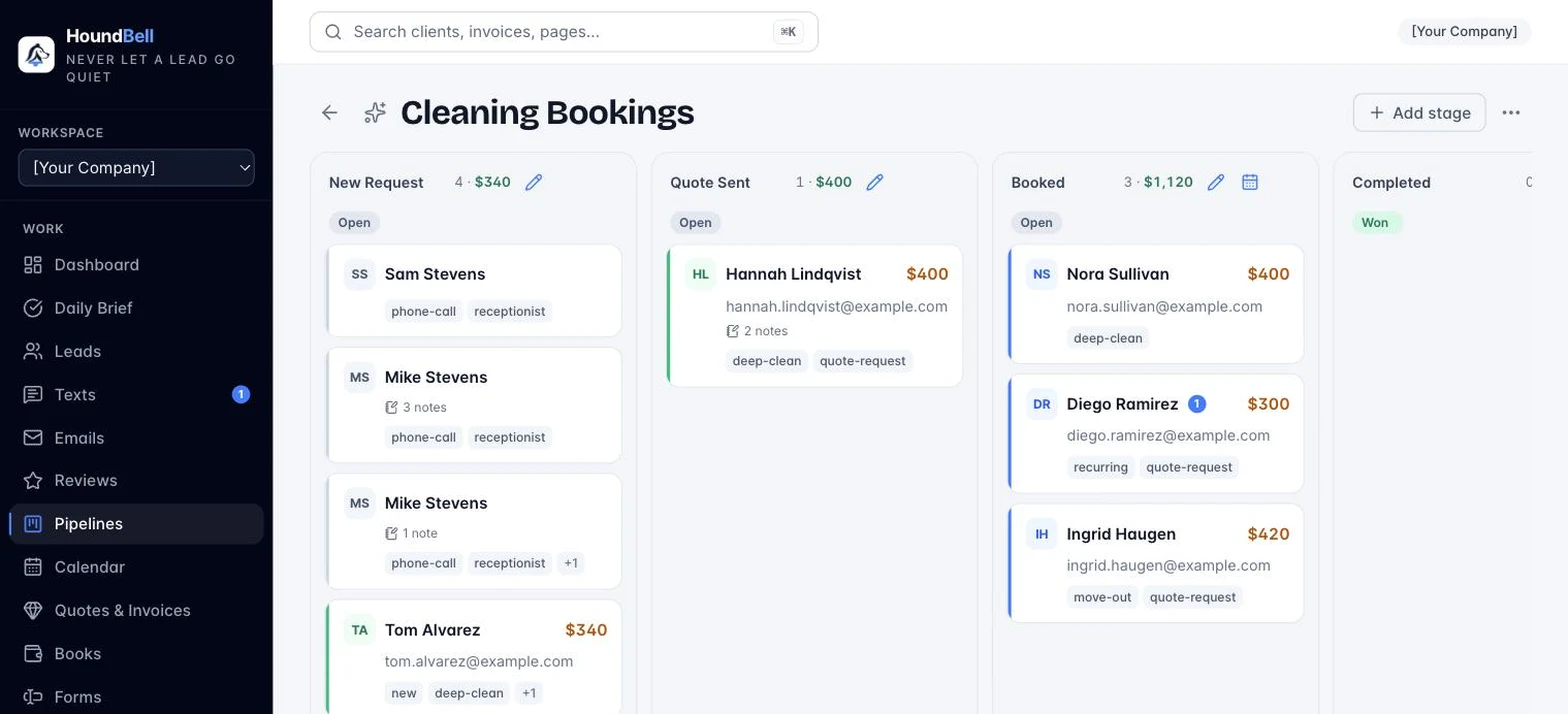
Stages you define, leads you drag. Multiple pipelines for multiple service lines, and every stage change feeds your revenue numbers on its own.
- Won, celebrated properly. Dropping a deal on Won pops a congratulations window with a prewritten thank-you email, your Google review link included, ready to send or edit on the spot.
- Lost, learned from. Lost deals ask why, with the reason saved to the client’s record, so you can see patterns in what slips away.
- Scheduling stages. Mark a stage as a scheduling stage and dragging a lead there opens the booking window, prefilled.
Book
A booking calendar wired to your website
A date field on your form renders as a full booking calendar on your site: month grid, morning, afternoon, and evening buttons, and exact times limited to your business hours. Requests wait for your yes.
Hours with breaks. Close for lunch, reopen for dinner; the booking page, the form calendar, and the AI receptionist all respect it. Directions on every job. Apple Maps on iPhone, Google Maps everywhere else, in the app and in the confirmation email.
- No double-booking. The website picker checks your real calendar every time a visitor clicks a day and greys out taken slots, buffer included.
- Booking requests, not surprises. Nothing lands on your schedule until you confirm it, and overriding a taken slot is always a deliberate decision.
- Your own booking link. A hosted page at app.houndbell.com/book/yourname with your logo, colors, and real availability. Put it in an Instagram bio, a Google Business Profile, or a text, and take bookings with no website at all.
- Print and export. Any view becomes a clean printed schedule or a CSV.
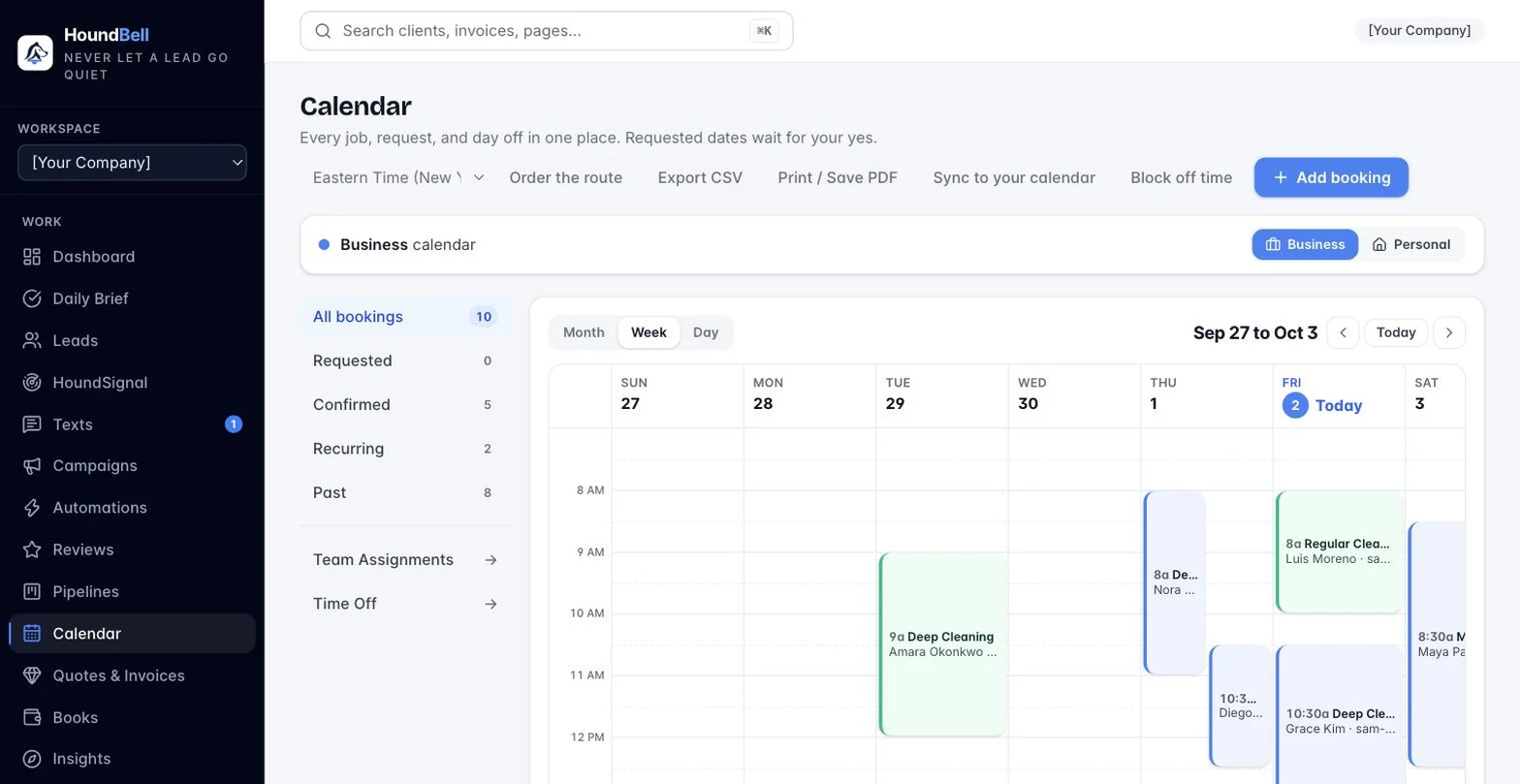
- Confirm with one click. Confirming emails the client a branded confirmation with add-to-calendar buttons. About an hour before every booking, both sides get a reminder worded with the actual minutes remaining.
- Recurring visits. Weekly, every two weeks, or monthly. The calendar rolls each visit forward automatically and reminders re-arm.
- Teams and crews. Group people into named teams and assign a booking to the whole crew at once, with a printable day-by-person crew sheet.
- Deposits and no-show fees. Ask for a card when someone books; the deposit is charged when you confirm, and the no-show fee is one button.
- Edit one visit or the whole series. Recurring jobs you can actually change, with a conflict warning on every visit.
- Route order for the day. Stops numbered, drive estimates, print it or open in Maps, and the crew sees the same order on their phone.
- Assign to shows who can go. Pick the time and every person and team reads free, busy then, or off that day.
- Block off time. Vacations, sick days, appointments, for the whole business or one person. Every blocked-off period is kept permanently in Time Off records.
- Two calendars, clearly separated. Business and personal each have their own view, sync link, and privacy: a banner always says which one you are looking at, and one click flips between them. Your personal calendar is yours alone.
- Google Calendar, two-way. Connect once from Settings and confirmed jobs land on Google with the client, the address and a link back, while anything already on your Google calendar blocks that time here and on your booking page. Move a job in either place and the other follows.
- Apple Calendar. Subscribe with a private link and confirmed bookings appear on your phone automatically. One way by design: Apple has no door for writing back.
- Your time zone, everywhere. Set it once and your hours, website slots, and reminders all agree on what 9:00 AM means.
- Their time zone too. The booking page shows every slot in the visitor’s own time when it differs from yours, and the confirmation and reminders say both: 5:30 PM (EDT), 3:30 PM MDT your time.
Get paid
Quotes clients accept from their phone
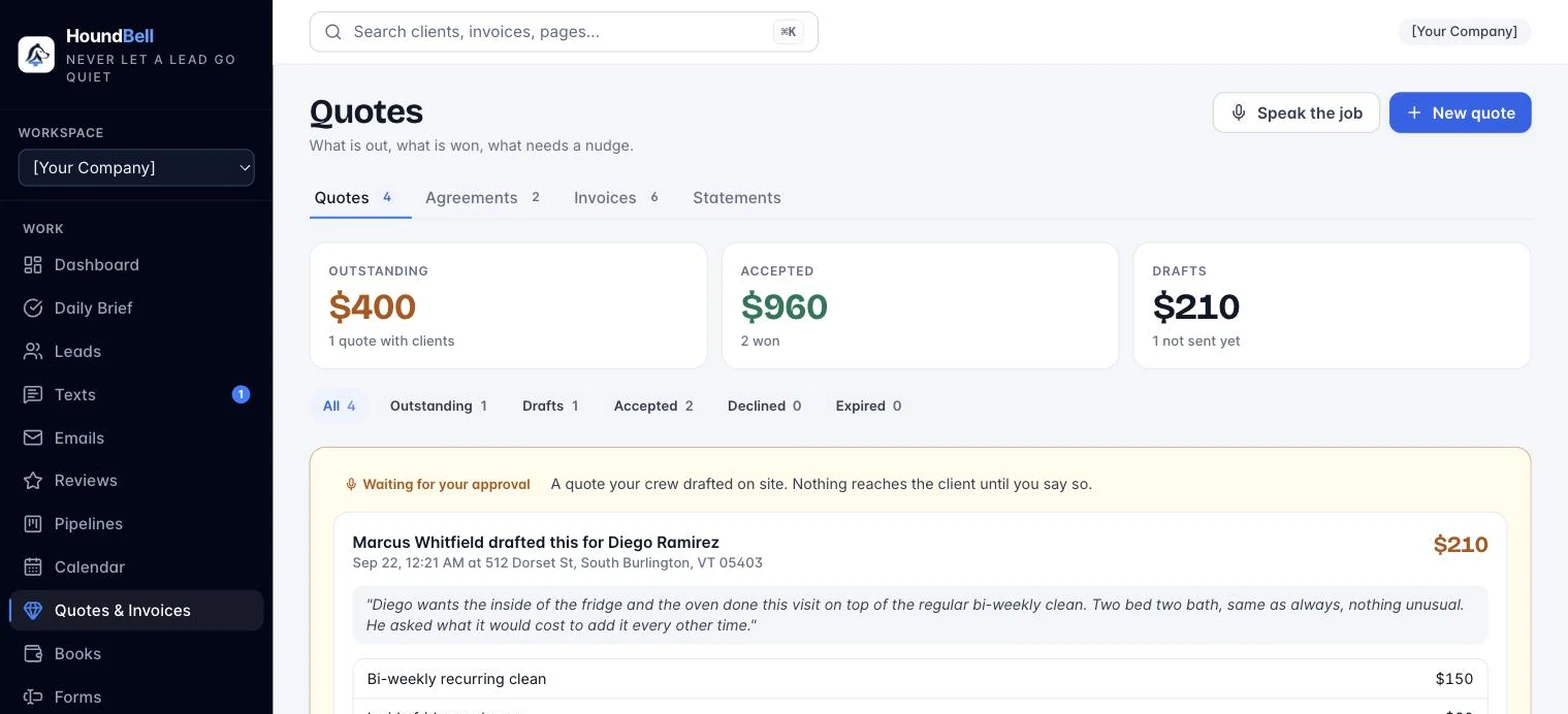
Itemized line items, sent by email, accepted or declined on a secure page with no login required. The deal value updates itself when they accept.
- Automatic follow-ups, on every plan. An unanswered quote gets a polite nudge on day 3 and day 7 by itself, and the chasing stops the moment your client answers. On by default, off with one click.
- A Recommended pick on Good, Better, Best. Mark the option you would choose; the client’s page carries the badge, and a $0 line reads Included.
- One-click reminders. Nudge a quote manually any time, with a 24-hour politeness guard so you never double-nudge.
- “Viewed but silent” is a signal. Status tracking runs from draft to accepted, so you always know which quotes deserve a follow-up.
- Speak the job. Describe the work out loud and a priced quote draft appears, built from your services list. Edit, then send. Contractors love it between site visits.
- Good, Better, Best. One switch turns a quote into three options. Your price book fills every tier, each tab shows its total, and the client picks from their phone with Better marked Recommended. The pick becomes the quote, so the invoice and the agreement follow it.
- Your price book, loaded once. Bring it in from a spreadsheet (csv or xlsx, columns matched, merged by code), edit every line and tier in Settings, and drop priced lines into quotes, invoices and agreements from a searchable picker. One tap, All three, fills a Good, Better, Best quote from an item’s tiers.
- Book it when they say yes. An accepted quote becomes a booking in one dialog, with an optional quote deposit. Or send a pick-a-day link and the booking page arrives prefilled with their quote.
- Preview, print, edit. See any quote or invoice exactly as the client will, marked Preview, not sent. Print or save a PDF in one click, drafts included, and reopen any draft with Edit draft.
- Attach the paperwork. Up to five files on any quote, invoice or agreement: the spec sheet, the photo, the permit. The client’s page lists them; emails link to the page instead of attaching bytes.
- Am I charging enough? One press on any quote line shows your own closed average and the trade’s anonymous range, with a Use price button. Nobody sees your name or your quotes; only the range.
Get paid
Contracts signed electronically, no extra subscription
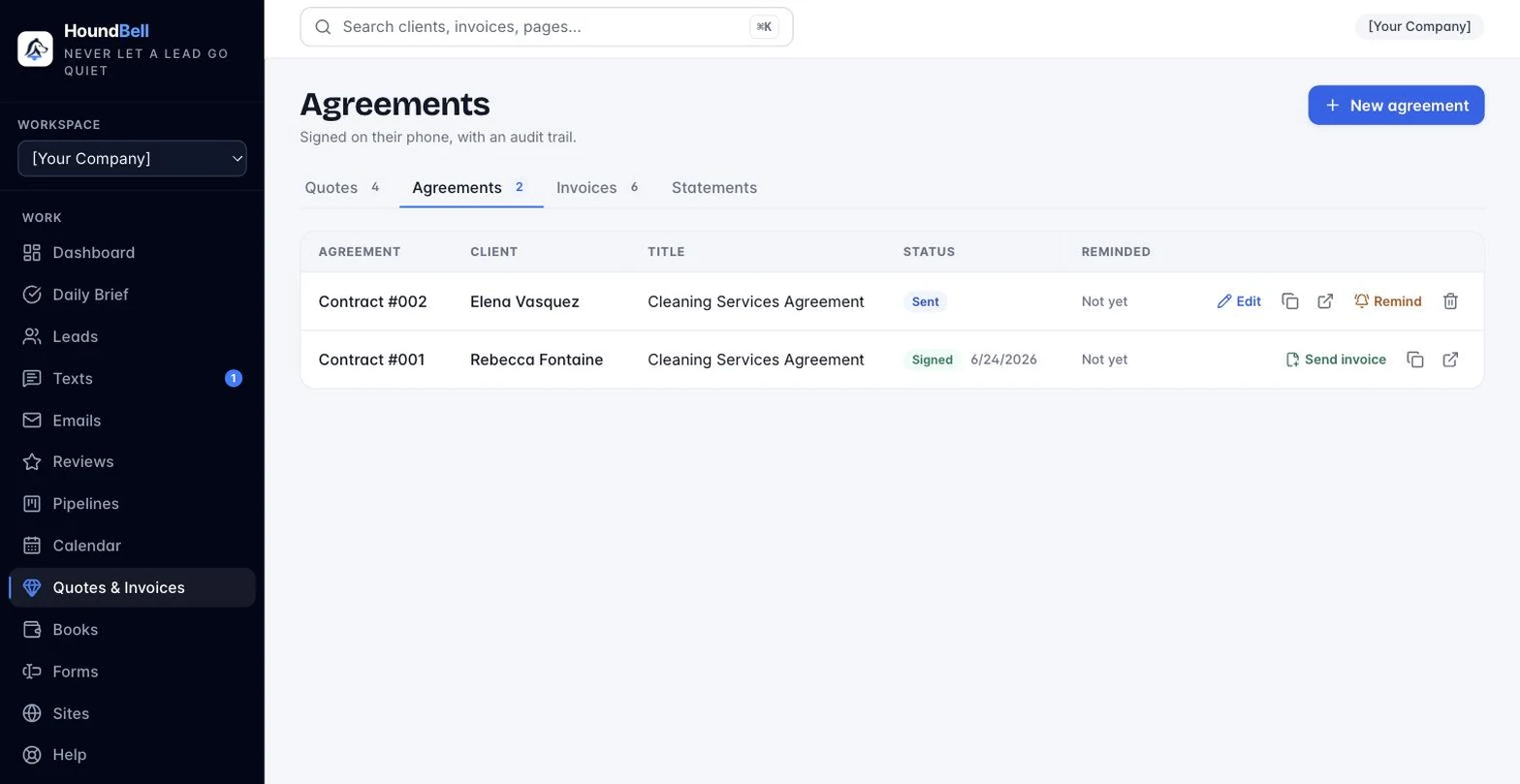
Send a service agreement and your client signs by typing their legal name on a branded page. No printing, no scanning, no third-party e-sign bill.
- A real contract builder. Clause cards you drag to reorder, a quick-add library of nine standard clauses, itemized services and pricing, and a live preview of exactly what your client will see.
- Templates for your trade. Marketing, cleaning, plumbing and trades, lawn care, and general home services, with a guard that asks before you send an unfinished template.*
- A complete audit trail. Signer name, exact time, IP address, and device captured at the moment of signing and attached to the locked, permanent record.
- From agreement to invoice. One click turns a signed agreement into an invoice carrying the same services and prices, item for item.
*Contract templates are general-purpose forms provided for convenience, not legal advice. HoundBell is not a law firm. Have a licensed attorney review any agreement before you rely on it.
Get paid
Invoices that collect the money
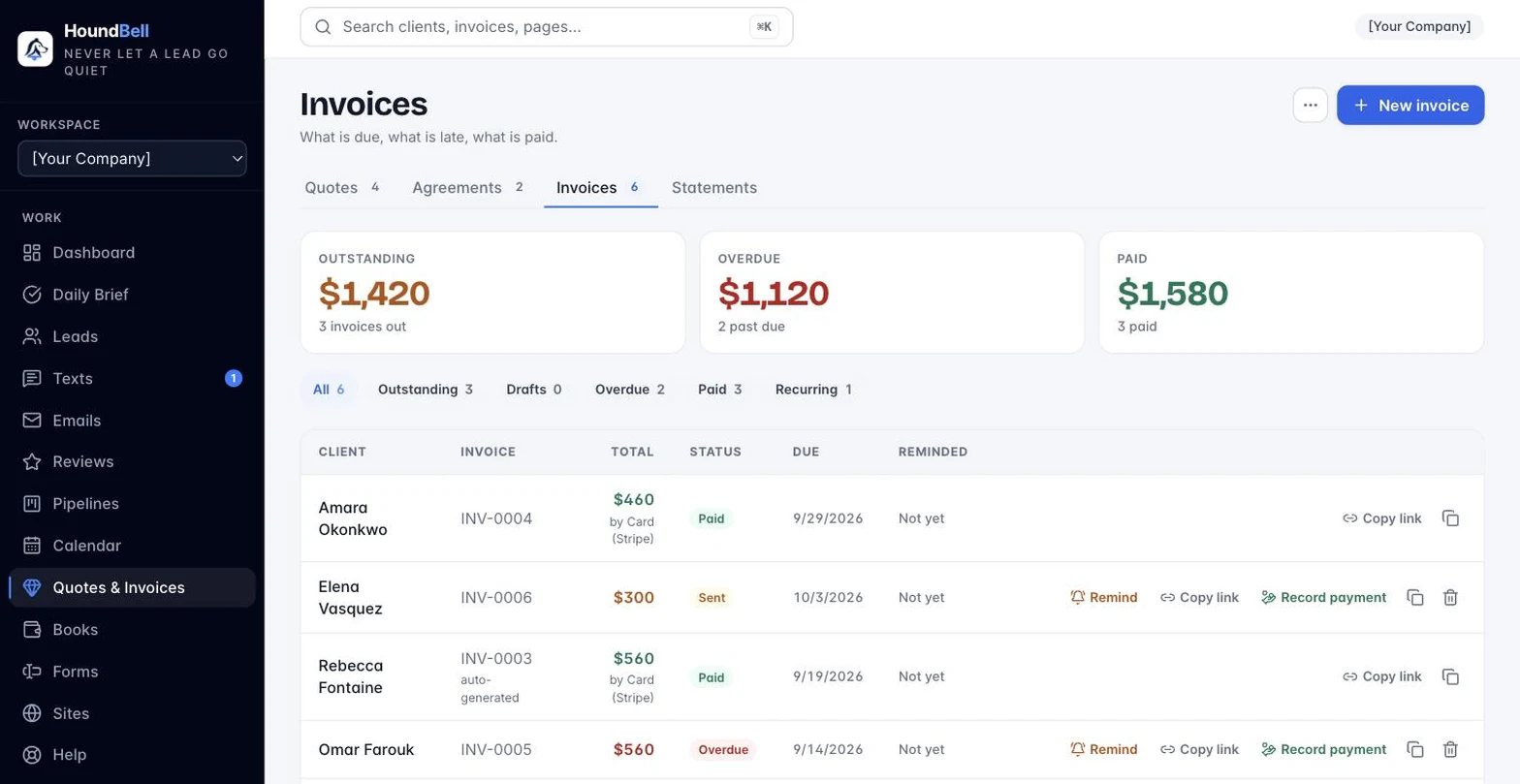
Connect Stripe once and every invoice gets a Pay Now button, powered by Stripe, with money going straight to your bank.
Autopay on recurring invoices. The client saves a card once, kept by Stripe on your connected account, and every future invoice pays itself. Receipts carry a one-click Stop link, you can turn it off from the client’s card, and a declined charge falls back to a normal Pay now email with an alert to you.
- Other ways to pay. Zelle, check, cash, Venmo: your instructions appear on every invoice alongside card payment.
- Recurring invoices, your rules. Repeat every so many weeks, months or years; end never, after a count, or on a date; due so many days after each copy. Each one emails itself, or saves as a draft with a push so you review it first. The list says it in words: every 2 months, 3 of 6 sent.
- Cash or check discount. Turn it on and every invoice shows two prices: $1,030.82 by card or $1,000 by cash or check. The legal shape of a card fee in every state, frozen when the invoice goes out so a settings change never moves a sent one.
- “You got paid!” Every payment sends you an email and a phone push the moment it lands. Clients get a branded receipt.
- Reminders with manners. Unpaid invoices get an automatic nudge on day 3, day 7, and one more the day after they go overdue, stopping the moment the money lands. One-click manual nudges stay, guarded against over-sending.
- Sales tax, tracked and frozen. Set your rate once; every quote and invoice carries it, and the numbers on a sent document never shift under you.
- The “I sent it” button. Cash, check, Zelle, Venmo, or e-transfer: the client taps one button on the pay page and you confirm the payment landed.
- Bring your own Square. Already on Square? Connect it and keep taking cards the way you always have. HoundBell adds nothing on top.
- Gift cards (Growth and up). Sold from your own page on your own Stripe account, emailed as a code, redeemed on any invoice, tracked in Books.
Measure
Statements and numbers you can stand behind
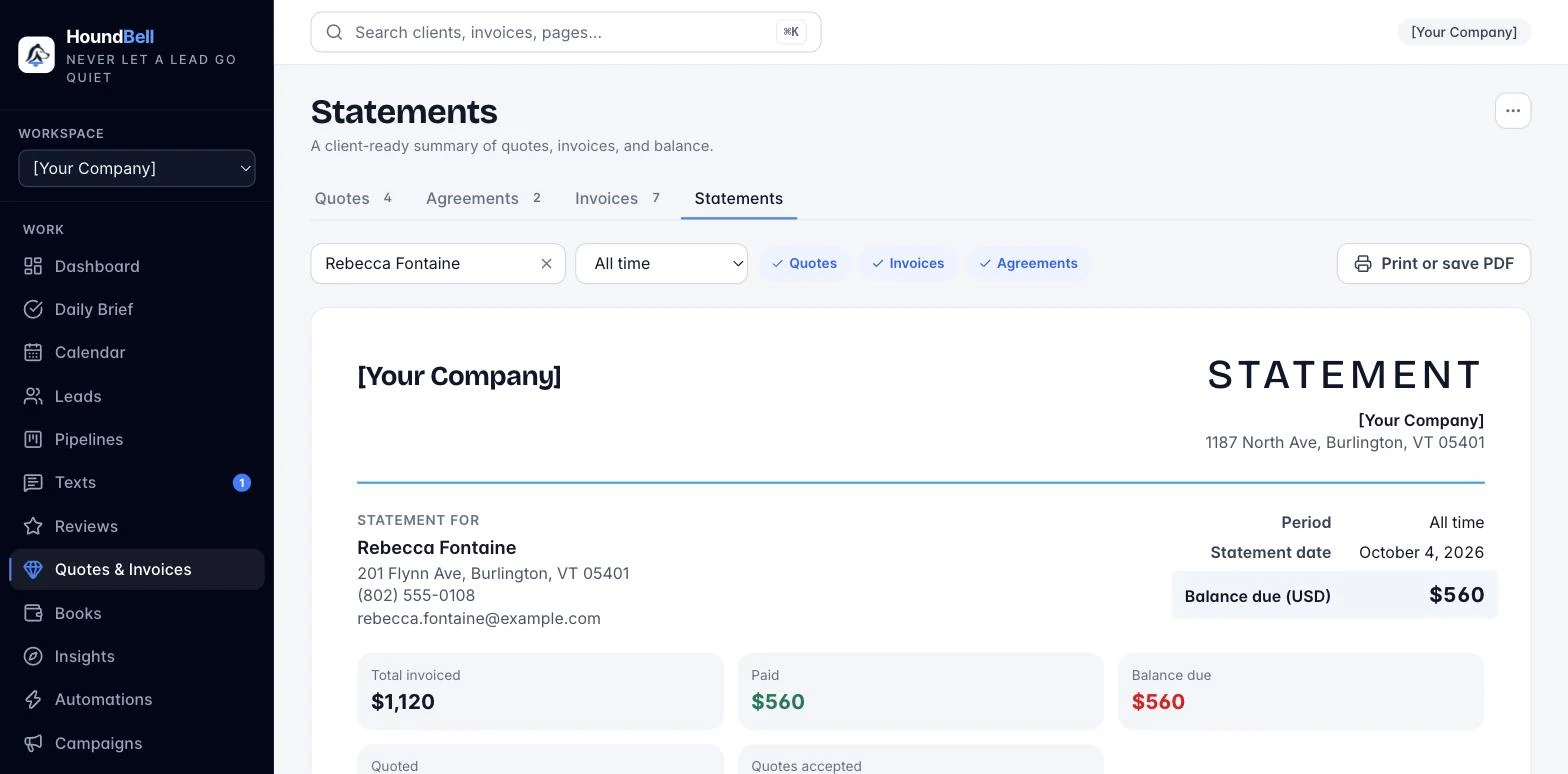
Pick a client and a period and get a client-ready statement of their quotes, invoices, and signed agreements, printable or exported to CSV.
- The Dashboard. Leads, revenue won, and pipeline potential for any window, with a revenue chart you can click into right down to the individual sale.
- Revenue by Service. Every service with revenue, jobs, average job value, share of revenue, open leads, and pipeline potential.
- Compare periods. Overlay the previous period or the same period last year on the revenue chart.
- Books. A simple ledger of money in and money out, with a tax pack your accountant will thank you for.
- Cash on Friday. The Daily Brief tells you what lands this week, and what to chase.
- Insights (Scale). Advanced reporting across Sales, Customers, and Team, revenue by lead source, employee ratings from reviews, and a Monday morning email.
- Job costing (Scale). Profit by job, service, crew, and customer, built from timesheets at pay rates, expenses, and invoices.
- People, side by side. Books shows employees in one column and contractors in the other. Payments file under Wages or Contract labor with the person linked, year-to-date stays right, and the tax pack’s contractor list stays clean.
And the rest
Built for the way you actually work
The details that make the whole thing feel effortless.
Reviews and reputation
- Your review link, working for you. Winning a deal offers a thank-you email with a Leave Us a Review button.
- Automatic review requests. A polite request goes out about two hours after a paid invoice or finished booking. Each client is asked at most once a year; a repeat customer earns a fresh ask.
Team and workspaces
- Delegate the work, keep the keys. Give each team member full working rights in exactly the areas you check: leads, calendar, quotes and invoices, pipelines, forms, or sites. Unchecked areas don’t exist for them. Every deletion comes back to you for one-tap approval with the reason attached, and your subscription, user management, and branding can never be delegated.
- Run every client from one login. Each business gets its own leads, branding, forms, pipelines, and money, and the Overview dashboard rolls it all up: revenue this month and this year, unique leads, pipeline value, and upcoming bookings for every business you manage, with grand totals across the portfolio. On the Scale plan, your booking pages, quote and agreement pages, and client emails carry only your brand, with no HoundBell badge.
Always in your pocket
- Install it like an app. HoundBell installs to your phone and works everywhere.
- Push notifications. New leads, answered quotes, payments, signatures, and booking reminders buzz your phone in seconds. The first time a client opens a quote, invoice, or agreement, you get one push naming them and the amount.
Built on trust
- Your website stays yours. The plugin renders forms natively in your theme and talks to the app over a signed, secure connection. Pairing is one time and revocable.
- A one-click repair. If your website is ever rebuilt or restored, the Reconnect button re-links it and pushes your forms back in one step.
your number, your name
Texting from your own business number
Growth and Scale include a local texting number provisioned in the app, riding an approved carrier campaign. Booking confirmations, reminders, and reschedules; quotes and invoices by text; review requests; automatic follow-ups; and two-way replies in a live thread on the client’s card, with a Texts inbox, unread badges, quick replies, and photo attachments.
Consent, built in
A separate SMS consent checkbox with carrier-approved wording is injected on every published form. STOP is honored automatically, always.
Quiet hours
Nothing sends between 9 PM and 7 AM in your timezone; messages hold and go out in the morning. A daily cap keeps volume sane.
On Starter
Add your own texting number for $10/month. Everything above works the same.
Missed call rescue: a missed call to your business number gets a text with your booking link before you have put the phone down.
hire people, not seats
Your team runs the business. Your crew sees their jobs.
Office users get area-by-area rights: leads, texts, calendar, quotes and invoices, pipelines, forms, sites. Deletions and cancellations by members become requests you approve from the Daily Brief. Field crew logins are free, always: they never count as a user on any plan.
My jobs, nothing else
A crew member sees only the jobs assigned to them or their crew: the client, directions, call, notes, and Done. Never the dashboard, leads, or money.
Canned texts only
Crew send owner-written messages from the business number with their first name filled in. No free typing, ever. Each crew can carry its own list; a crew without one uses the business list. Before-and-after job photos, straight from the phone camera: crew tap Before or After on the job, the office sees every shot on the booking and the client’s card.
Assignments board
Assign a booking to a person or a crew, print crew sheets, track time off. Growth and up.
Works in a dead spot
No signal in the basement? Every tap waits in an outbox on the pass: On my way, Done, notes, the checklist, photos. When the signal comes back it all sends in order. Nothing is lost.
Spanish and Portuguese
Each crew member picks their language. The pass, the mic, and the morning job text follow it, and the mic listens in that language. Anything your clients see stays exactly as you wrote it.
Notes and parts to the office
Write a note or tap Need a part, speak it, add a shelf photo. The office gets a push, the request lands on the job, and the invoice builder offers the parts as lines.
Nearest next
One switch and the next job is the closest one to where the phone is, re-chained after every Done. The phone’s location never leaves the phone.
Sign it on site
An unsigned agreement or an open quote can be signed or accepted right on the tech’s phone, with the crew member recorded as the witness.
More than before and after
A third photo button, More, takes the panel, the meter, the broken part. Extras ride along on the client’s photo page under the pair.
A work record that travels
Every crew member gets a public page: jobs done, hours, photos and the reviews that name them, stamped by the app at the time. Theirs to share, with a switch on both sides.
New for crews: a time clock with timesheets and payroll exports, one-tap On my way texts, before-and-after photos, crew quoting (describe the job out loud, the office approves, the client gets the quote), change orders the client approves from a text, and a Know before you go panel with gate codes and site notes, a morning text with the day’s jobs in route order, and the route on a map with Street View at every stop.
New for the crew and their clients: Where is my tech? The On my way text carries a link where the client sees who is coming, with the tech’s photo and first name, each stamp as it happens, and, while the tech shares location, how far out in miles and minutes. Coordinates never reach the client. A face, not a company: confirmations, reminders and the review ask all carry the tech’s photo and name. Upsell with a photo: the crew adds work from the job with a price book pick, the client gets the price and the picture by text and approves from their page, and approved lines fold into the invoice. Client texts reach the crew: a reply lands on the job’s pass and the crew member’s phone, and every text names the job, your Deep clean, 3 bed 2 bath, never a record number.
set up by lunch
Pick your trade. Bring your clients. Go.
Choose one of 31 service trades at setup and HoundBell creates a pipeline, a website form, booking services, and a contract template for that trade. Then import your client list from Jobber, Housecall Pro, ZenMaid, HoneyBook, HubSpot, Pipedrive, HighLevel, or any spreadsheet: the file is recognized from its headers, columns are matched, duplicates are skipped, and every row is tagged by batch. A guided setup card walks the eight steps with you.
New trades, built properly: dog training, mobile pet care (grooming, walking, sitting), personal training, coaching, and massage therapy each arrive with a form, pipeline, agreement, starting prices, and follow-ups written in that trade’s voice. Pet businesses get pets on the client card with shot reminders, and every trade can sell session packs and send branded report cards after the job.
never miss the call
A receptionist that answers when you can’t
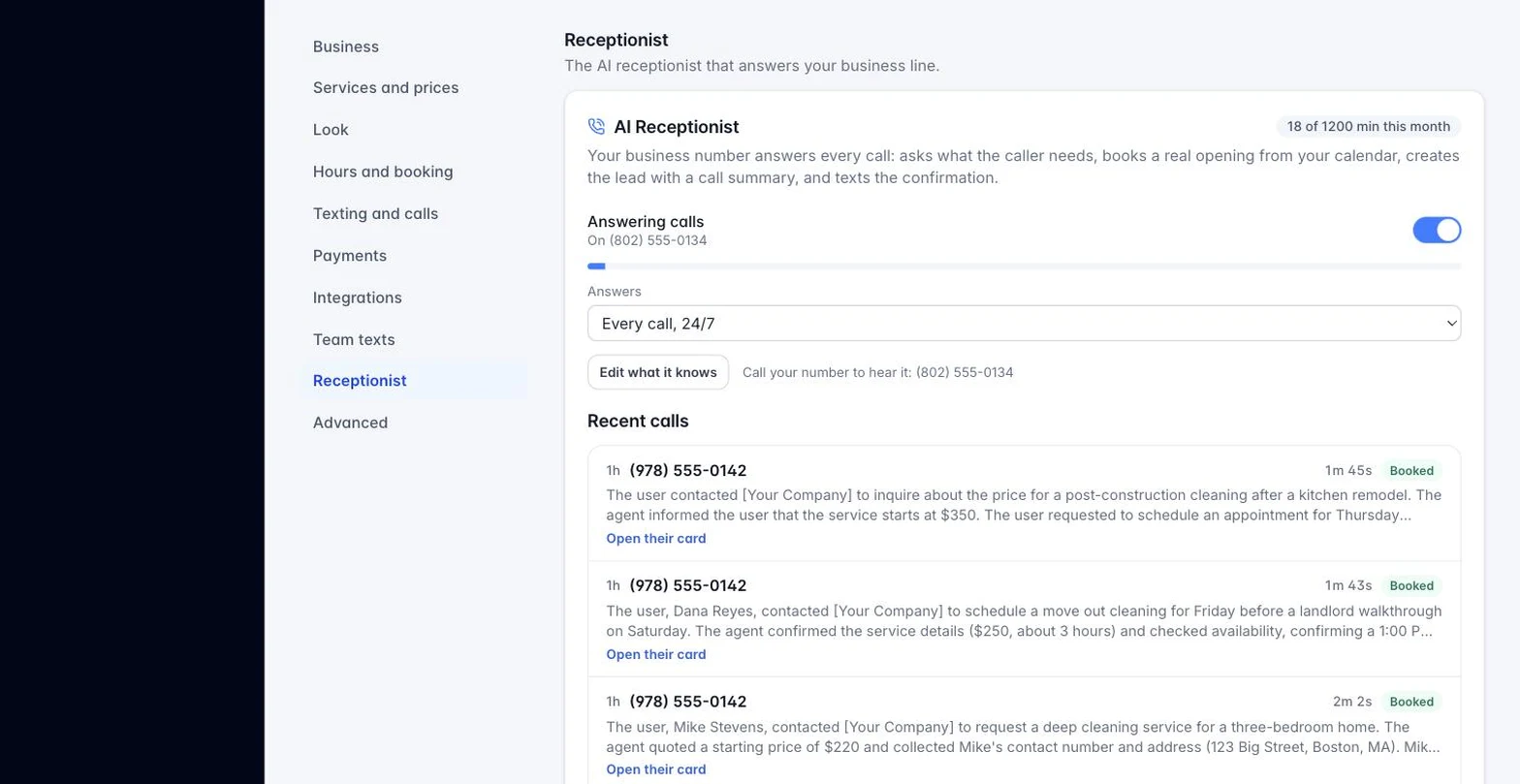
The AI Receptionist is live as an add-on on any plan. Your business number answers every call, or only the ones you miss, asks the right questions, books a real opening on your calendar, creates the lead with a call summary, and texts the confirmation.
- Always on, or backup only. Answer every call, or only the ones that would have gone to voicemail.
- Real bookings, not messages. It reads your live calendar and books actual openings, honoring your hours and breaks.
- Every call becomes a lead. A card with the caller, the summary, and the booking, waiting in your pipeline.
- Five-minute setup. Turn it on from Settings; usually live within one business day. Free during your 14-day trial, and paying accounts get a free 30-minute test drive.
From $57 a month for 150 minutes. See the full receptionist page or hear it answer.
Integrations
Plays well with others
- Stripe. Connect your own Stripe account once and invoices collect by card, straight to your bank.
- Google Calendar and Apple Calendar. Private sync links put every confirmed booking on the calendar already on your phone, and every confirmation email carries one-tap add-to-calendar buttons.
- Google sign-in. One click to sign in with the account you already have.
- WordPress. First-class support: our free plugin renders forms natively in your theme. On any other platform, your hosted booking page and link do the same job, no plugin needed.
- CSV everywhere. Leads, calendars, statements, services, time off: every table exports to a file Excel and Google Sheets open directly.
- Webhooks: send your events anywhere. Your other tools hear the moment something happens in HoundBell: a new lead lands in a Google Sheet, a paid invoice pings your Slack, a booked job updates your own system. Every message is signed so the receiver can prove it came from you, and Zapier and Make connect in about a minute. Available on Growth and Scale.
- Square. Bring your own Square account and invoices charge through it, with HoundBell adding nothing on top.
Zoom meeting links land on confirmed virtual bookings, and the official Zapier app (Growth and up, via your API key) connects everything else, and Google review sync and reply automation is live on Growth and Scale: connect your Business Profile and every review is pulled, with replies drafted in your voice. QuickBooks Online sync is live on Growth and Scale, and Xero sync is built and follows as soon as the Xero app connection is finalized. More is on the public roadmap.
Built securely from day one. Bot-protected booking pages, spam screening on every form, tamper-proof e-signature records, encrypted API keys, and strict per-person access controls. Your client data is walled off per business, and only the people you choose can touch it.
Want to see exactly how everything works before you sign up? Explore the help center’s step-by-step guides.
All of it, in one login.
Stop stitching seven subscriptions together. Capture the lead, book the job, sign the deal, send the bill, and watch the money land.