
The crew pass with no signal
A basement with no bars used to mean lost notes. Now everything the crew taps with no signal lands in an outbox on the pass and sends itself when the signal is back.
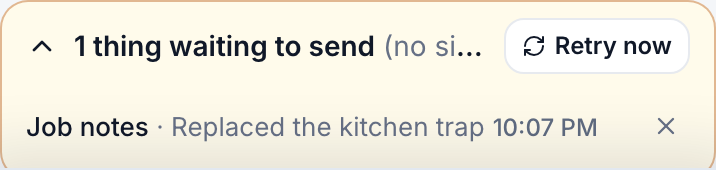
- What waits: On my way, Arrived, Done, job notes, site notes, the checklist, photos, notes to the office, and part requests. Photos wait in the phone’s own storage, so the queue survives a closed browser.
- The strip: a yellow line on the pass that reads “1 thing waiting to send (no signal, sends when you are back on)”. Open it to see each action with its job and time. Retry now sends immediately; the X removes one line.
- Back online: the queue sends in order, the pass flashes the usual “Notes saved”, and the strip goes away.
The schedule keeps working offline too: the pass shows the day as it was saved at the last sync, with a quiet “Offline, showing the schedule saved at 10:07 PM” line so nobody is guessing.
There is nothing to set up. The outbox is on for every crew member, on every plan.
Still stuck?
Email us and a person will answer. Include your workspace name, and the quote or invoice number if it is about one.
Email support@houndbell.com