
The form builder, top to bottom
Instant reply for this form. Every submission gets an automatic “we got your request” email in your business’s name. If one form deserves its own words (a waitlist, a job application, an event), fill in the subject and body under Instant reply for this form; that form sends your text instead. Use {first_name} and {business} as placeholders, and a blank line for a new paragraph. Leave it blank to keep the standard email.
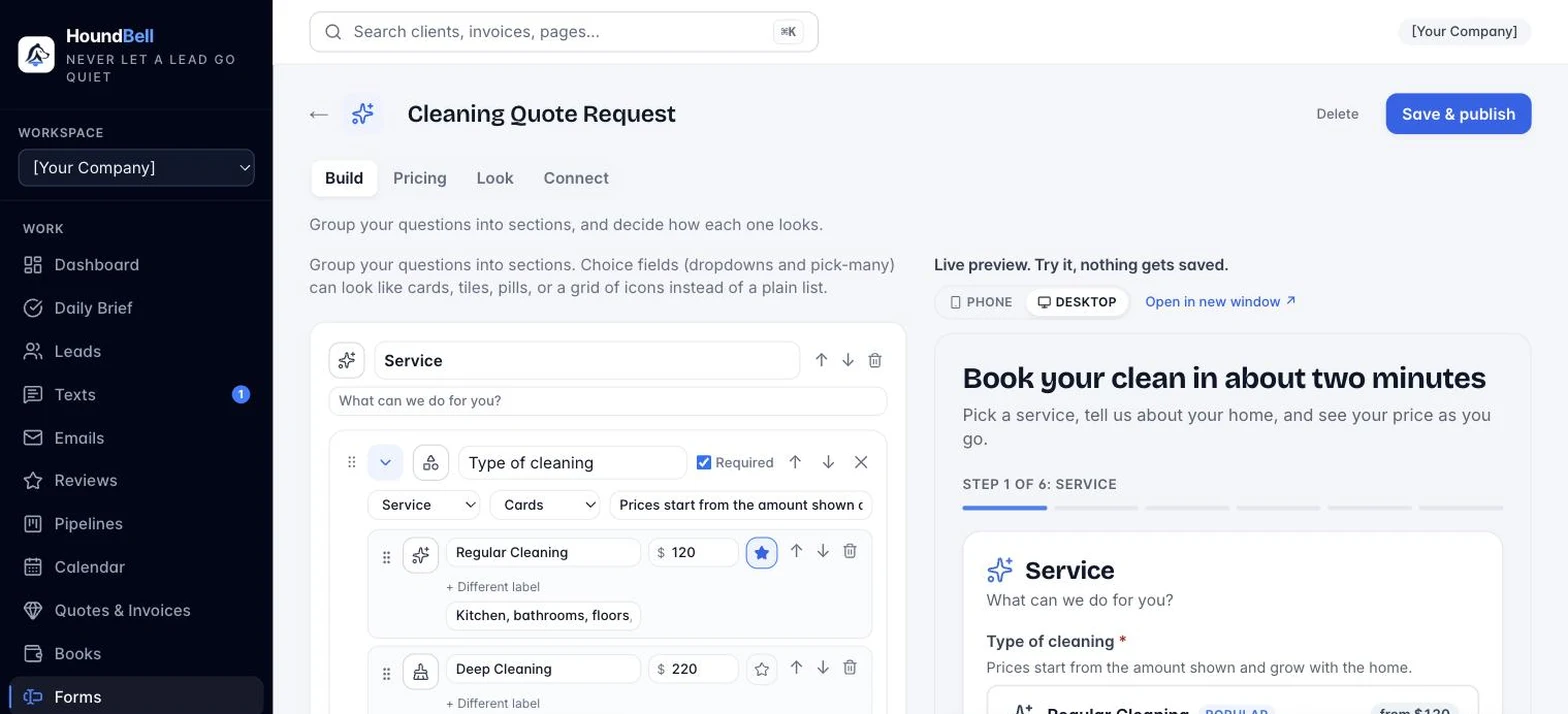
Screenshot: `images/form-builder.png`
The builder has your settings on the left and a live preview on the right. The preview is labeled Live preview — try it, nothing gets saved, and it updates as you type. Open in new window pops the preview into its own tab; it streams your edits live, even before you save.
Destination card:
- WordPress site: which connected site this form belongs to. A form must be assigned to a site before the shortcode will render there.
- Leads go to pipeline: new submissions land in this pipeline, at its first stage.
- Submit button text: what the button on your website says, for example “Request My Free Quote.”
- Tags for new leads (comma-separated): every submission gets these tags automatically, which makes filtering easy later.
- Success message: what the visitor sees after submitting.
- Shortcode for this form: the snippet you paste into WordPress (Article 3.4).
Fields: add, remove, reorder, and edit the questions. Drag the ⠿ handle on any field to arrange the form exactly how you want it (the arrows still work too). Field types include text, email, phone, address (with browser autofill, and a “Get directions” link on the lead card), long answer, dropdown, checkbox, and date (the booking calendar). For dropdown choices, separate each choice with a comma. Mark fields required as needed. If you try to leave the builder with unsaved changes, HoundBell asks before letting you go.
Under the field buttons are four Quick adds, ready-made building blocks: a Booking calendar (inserts the date field and wires it to booking requests in one click), a Services dropdown (pre-wired to service routing and per-service deal values), a “How soon do you need this?” dropdown (ASAP / this week / this month / just researching, so you call the hottest leads first), and a text-consent checkbox (“It’s OK to text me about my request”), worth collecting now so future texting features can use it.
Phone fields validate themselves (plugin 1.7.0). On your website, every phone field shows a country menu with flags and dial codes: United States, Canada, and the United Kingdom lead the list, and it defaults to the US. The number is checked against the chosen country’s rules before the form will submit, so an impossible number never reaches you. US numbers format live as (555) 123-4567, a typed leading 1 is stripped automatically, and every number is stored with its country code (+1, +44, and so on). Existing forms get this automatically, no re-publish needed, once the plugin is updated.
Every submission also arrives with marketing attribution filled in automatically (plugin 1.5.0): if the visitor came from an ad or tagged link, the lead’s Submission section shows `marketing_source` and `marketing_campaign`; if they came from a search engine or another site, the referring site is recorded instead. No cookies, nothing to configure, and it finally answers “which marketing actually brings the leads?”
Service values card: set an average deal value for each service your form offers. When a lead picks that service, the lead arrives pre-priced, so your pipeline potential is accurate without editing each lead. You can still adjust any lead later.
Design card: title, fonts, colors, and corner roundness, so the form matches your website.
When you are done, click Save & publish in the top right. Publishing updates the form on your website instantly; there is nothing to re-paste.
Still stuck?
Email us and a person will answer. Include your workspace name, and the quote or invoice number if it is about one.
Email support@houndbell.com