
Two-way Google Calendar sync
Connect once and your two calendars stop disagreeing: HoundBell jobs appear on Google, and whatever is already on Google blocks that time here.
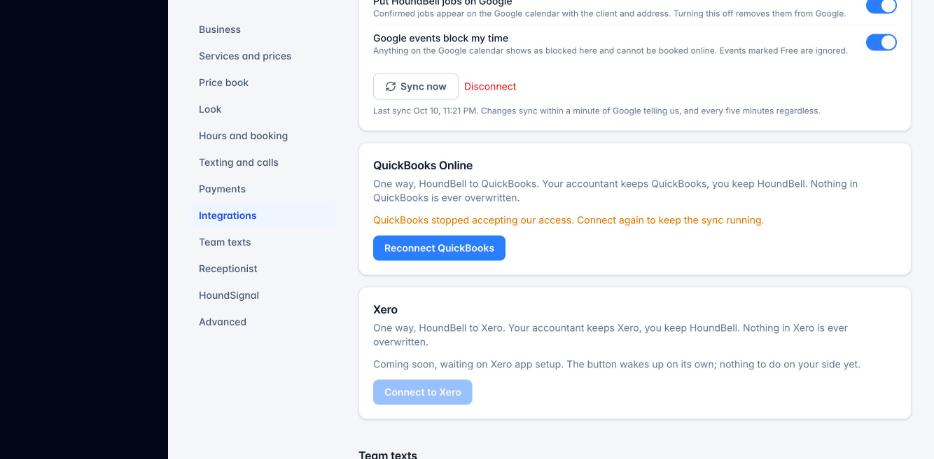
- Go to Settings, Integrations, Google Calendar and press Connect. Google asks once. HoundBell picks your main calendar; Change calendar lists the rest.
- Put HoundBell jobs on Google: confirmed bookings become events with the client, the address and a link back. A change here updates the event; a cancel removes it.
- Google events block my time: anything on the Google calendar becomes a “Google:” block that greys the time on your calendar and your booking page. Events marked Free are ignored.
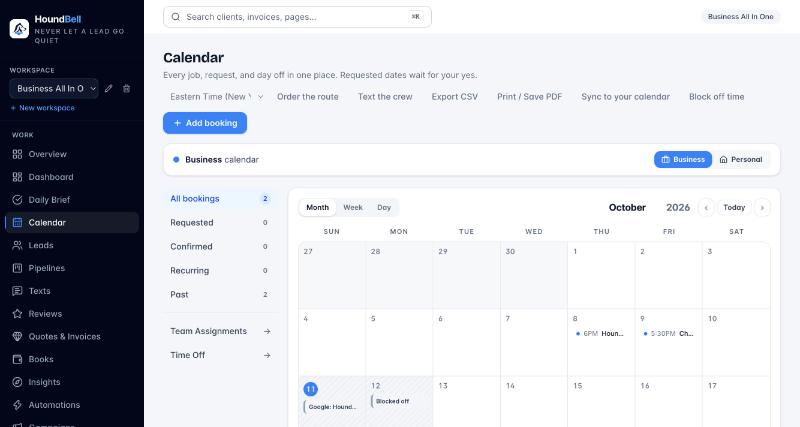
A HoundBell job moved in Google moves here. One deleted in Google stays on HoundBell and you get a push, so a slip of the finger on your phone never loses a job. Changes arrive within minutes. Sync now and Disconnect sit on the card; disconnecting removes the Google blocks here and leaves your events on Google alone.
With a team, one person’s Google block uses one unit of capacity instead of closing the business: if two trucks can run at once, a block on your calendar still leaves the second truck bookable.
Apple Calendar stays one way by design, HoundBell to Apple, because Apple has no door for writing back without your Apple password. The Subscribe and Copy link buttons are on the same Integrations page.
Client time zones: a virtual booking can carry the client’s own zone, and the booking page reads a visitor’s zone from their browser. Confirmations and reminders then say both, like 5:30 PM (EDT), 3:30 PM MDT your time.
Still stuck?
Email us and a person will answer. Include your workspace name, and the quote or invoice number if it is about one.
Email support@houndbell.com